

Capturas de tela do APK de ChromaFusion Launcher - Themes


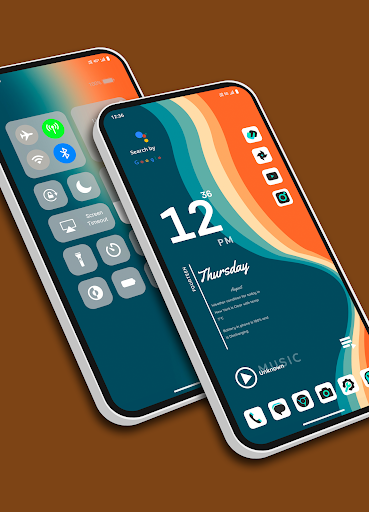


Informações do aplicativo ChromaFusion Launcher - Themes
Fontes de download
Device Configuration
Guia de Instalação de Split APKs
Alguns aplicativos são distribuídos como Split APKs (vários arquivos .apk empacotados juntos) para otimizar os recursos. Os instaladores padrão do Android não podem abri-los.
Novidades no ChromaFusion Launcher - Themes
Bug fixed.
Sobre ChromaFusion Launcher - Themes
Transform your Android device's home screen with the Chroma Fusion Launcher and experience the allure of the chroma fusion theme like never before! Dive into a world of unique and customizable widgets that will elevate your smartphone experience to a whole new level.
🌌 Key Features 🌌
1. **Stunning Wallpapers**: Choose from wallpapers within the launcher. Plus, you have the freedom to apply wallpapers from your gallery to create a unique look.
2. **Unique Themes and Widgets**: Explore 18 meticulously crafted themes, each designed with focused frame and unique wallpapers and widgets that perfectly complement your style.
3. **Icon Pack Variety**: Tailor your device's look with ease by switching between 43 unique icon packs. Customize the color and padding of select packs for a truly personalized touch.
4. **Personalized Home Screen**: Arrange your icons and widgets to create a home screen that truly reflects your personality and preferences.
5. **Effortless Folder Creation**: Create folders easily by dragging and dropping apps, customize them with a long press, and choose between large or small grid layouts for folder.
6. **Intuitive Drag and Drop**: Bring more apps to your home screen by intuitively dragging and dropping them for quick access.
7. **Versatile App List**: Enjoy the convenience of two app list formats—grid and list view—both featuring alphabetized index search and regular search options.
8. **Instant Notification Counts**: Stay on top of your notifications with a quick glance at the app icons, which display the notification count for a faster response.
9. **Versatile Widgets**: Choose from a variety of widgets, including calendar, clock, digital clock, weather, greetings, and more, with 15+ options to enhance your home screen. You can resize each and every widget, you can also apply system widgets.
10. **Customizable Weather Forecast**: Select your preferred city for weather forecasts and stay informed about the conditions that matter to you.
18. **Flexible Font Sizes**: Customize your text by choosing from three font sizes—small, medium, or large—to suit your visual preferences.
12. **App Privacy**: Maintain your privacy by hiding specific apps from the app list. Easily access hidden apps in the settings under the "Hidden Apps" section.
13. **App Lock Feature**: Keep your sensitive apps secure with our built-in app locking feature. Set up a password to safeguard your apps from unauthorized access.
14. **Control Center**: Access Control Center by swiping down on the main screen. Easily control music playback and quickly toggle various settings.
Download the Chroma Fusion Launcher now and embark on a journey of unparalleled customization, aesthetics, and functionality for your Android device. Upgrade your home screen and unlock a world of possibilities today!
Avaliações de usuários

Usando o App... Realmente me surpreendeu, Leve prático, e super inteligente o seu app deu outra cara ao meu celular Ele é um Moto G100 mas com esse app ficou muito melhor . Vcs são muito bons ... Parabéns

Launcher muito bonito, boas opções de personalização. As únicas coisas que não gostei são que, ao executar a limpeza de cache do celular, recarrega o launcher e o tema e isso chateia um pouco; e o widget de clima mostra cerca de 4-5 ºC a menos do que a temperatura real.

muito lenta ao abrir a are de trabalho.

excelente laucher com um visual bastante bonito e muito funcional nota 100
Como baixar o APK do ChromaFusion Launcher - Themes
- Insira o nome do pacote
com.lwsipl.chromafusion.launcherna APK Downloader. - Selecione a arquitetura do seu dispositivo (ARM64 recomendado para dispositivos modernos).
- Clique em Baixar para obter o arquivo APK mesclado.
- Transfira e instale o APK no seu dispositivo Android.
- Mantenha-se atualizado: Visite o APKDER.COM regularmente para pesquisar e baixar as versões seguras mais recentes de seus aplicativos favoritos.
Perguntas frequentes
Sim! Cada download de APK fornecido pelo APKDER passa por uma rigorosa verificação de segurança. Verificamos se a assinatura criptográfica do arquivo APK corresponde à assinatura oficial do desenvolvedor, garantindo que o APK seja original, intacto e livre de quaisquer modificações.
Para instalá-lo, você precisa ativar "Fontes Desconhecidas" nas configurações de segurança do seu dispositivo Android. Depois de baixar o arquivo APK do APKDER, toque nele para iniciar a instalação e siga as instruções na tela.
Sim! Assim que o desenvolvedor lançar uma nova versão de ChromaFusion Launcher - Themes, atualizaremos o APK no APKDER. Você pode simplesmente baixar e instalar o novo APK por cima do existente sem perder os dados do seu aplicativo.
Sim. O APKDER permite contornar as restrições geográficas e baixar arquivos APK oficiais diretamente, mesmo que o aplicativo ou jogo não esteja disponível oficialmente na loja do seu país.
Um APK padrão é um único pacote de instalação. Um XAPK ou Split APK contém múltiplos arquivos de recursos agrupados. Para instalá-los, você pode baixar as divisões individualmente ou usar ferramentas auxiliares como o Split APKs Installer (SAI).
Segurança e Verificação de Assinatura
Este download de APK é 100% seguro. Verificamos se a assinatura criptográfica do arquivo corresponde às credenciais oficiais do desenvolvedor. Sem modificações ou adware embutidos.


