




Источники загрузки
Device Configuration
Руководство по установке Split APK
Некоторые приложения распространяются в виде Split APK (несколько упакованных вместе файлов .apk) для оптимизации ресурсов. Стандартные установщики Android не могут их открыть.
Что нового
fixed maintenance feedback issue
О приложении
Never lose track of what’s in which box. Inventory Nest is a simple, powerful organiser that mirrors your physical storage: set up Locations, Boxes, and Items to catalogue everything you own. Fast search, saved filters, and QR/barcode scanning help you find any item in seconds all offline and without an account for total privacy.
Perfect for:
• Home, garage & attic organisation
• Small businesses & resellers managing stock
• Collectors, hobbyists & DIY enthusiasts
• Anyone who’s tired of forgetting what’s in which box
What you can do:
• Organised inventory: Create Locations (e.g. rooms, cupboards) and nest Boxes within them, then add Items to each box – a one-to-one mirror of your real-world storage.
• Find anything fast: Search by name, description or category. Filter items by tags, date or location, and save filter sets to reuse them in seconds.
• Detailed items: Add photos, tags and notes for each item. Track quantities, purchase dates, warranty/expiration dates, and estimated value to keep tabs on your belongings.
• QR & Barcode scanning: Generate and print QR code labels for boxes and items. Use the built-in scanner (UPC/EAN, Data Matrix, etc.) to jump straight to any item or box.
• Favourites & tasks: Star important items for quick access. Create linked to-do lists or shopping lists for tasks related to your inventory.
• Track borrowing & stock: Record who borrowed items (and when they’re due back). See low-stock and expiring items in dedicated lists to stay on top of consumables.
• Customers & orders: Manage customers, record sales and purchases, and export order history as PDF or Excel (ideal for small shops or resellers).
• Backup & restore: Export a full local backup of your inventory to your device or Google Drive for safekeeping. No account needed.
• Dark mode: Easy on the eyes in any light.
FREE features: Everything above is free. No limits on Locations, Boxes or Items. The free version includes all core organisation, search, QR/barcode, backup, favourites, to-do, change history, and business-tracking features.
Upgrade to Pro (affordable subscription) for power users:
• Kits: Group items into kits or bundles (camera kit, toolset, emergency kit).
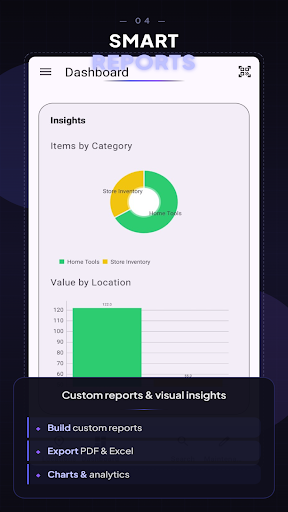
• Advanced reports & charts: Pre-built and custom reports; visualise inventory value by category or location.
• AI & OCR scanning: Identify products from photos and extract text from receipts or manuals.
• Custom fields & attachments: Add serial numbers, warranty info; attach PDFs/manuals to items.
• Proactive reminders: Schedule maintenance and get alerts for low stock, expiring items, or warranty dates.
• Cloud backup & sync: Automatic backups to your Google Drive and CSV/Excel import & PDF/HTML export.
• All future Pro features.
Get Inventory Nest and take control of your stuff, organise your entire home or business inventory with confidence!
Как скачать APK Mobile Inventory Manager-nest
- Введите имя пакета
com.kaadan.inventorynestна APK Downloader. - Выберите архитектуру вашего устройства (для современных устройств рекомендуется ARM64).
- Нажмите Скачать, чтобы получить объединенный файл APK.
- Перенесите и установите APK на свое устройство Android.
- Следите за обновлениями: Регулярно посещайте APKDER.COM, чтобы искать и скачивать последние безопасные версии ваших любимых приложений.
Безопасность и проверка подписи
Эта загрузка APK на 100% безопасна. Мы проверяем соответствие цифровой подписи файла официальным ключам разработчика. Изменения и реклама отсутствуют.


