

Скриншоты APK ChromaFusion Launcher - Themes


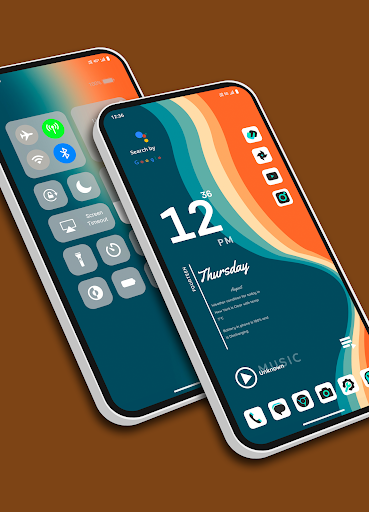


Информация о приложении ChromaFusion Launcher - Themes
Источники загрузки
Device Configuration
Руководство по установке Split APK
Некоторые приложения распространяются в виде Split APK (несколько упакованных вместе файлов .apk) для оптимизации ресурсов. Стандартные установщики Android не могут их открыть.
Что нового в ChromaFusion Launcher - Themes
Bug fixed.
О приложении ChromaFusion Launcher - Themes
Transform your Android device's home screen with the Chroma Fusion Launcher and experience the allure of the chroma fusion theme like never before! Dive into a world of unique and customizable widgets that will elevate your smartphone experience to a whole new level.
🌌 Key Features 🌌
1. **Stunning Wallpapers**: Choose from wallpapers within the launcher. Plus, you have the freedom to apply wallpapers from your gallery to create a unique look.
2. **Unique Themes and Widgets**: Explore 18 meticulously crafted themes, each designed with focused frame and unique wallpapers and widgets that perfectly complement your style.
3. **Icon Pack Variety**: Tailor your device's look with ease by switching between 43 unique icon packs. Customize the color and padding of select packs for a truly personalized touch.
4. **Personalized Home Screen**: Arrange your icons and widgets to create a home screen that truly reflects your personality and preferences.
5. **Effortless Folder Creation**: Create folders easily by dragging and dropping apps, customize them with a long press, and choose between large or small grid layouts for folder.
6. **Intuitive Drag and Drop**: Bring more apps to your home screen by intuitively dragging and dropping them for quick access.
7. **Versatile App List**: Enjoy the convenience of two app list formats—grid and list view—both featuring alphabetized index search and regular search options.
8. **Instant Notification Counts**: Stay on top of your notifications with a quick glance at the app icons, which display the notification count for a faster response.
9. **Versatile Widgets**: Choose from a variety of widgets, including calendar, clock, digital clock, weather, greetings, and more, with 15+ options to enhance your home screen. You can resize each and every widget, you can also apply system widgets.
10. **Customizable Weather Forecast**: Select your preferred city for weather forecasts and stay informed about the conditions that matter to you.
18. **Flexible Font Sizes**: Customize your text by choosing from three font sizes—small, medium, or large—to suit your visual preferences.
12. **App Privacy**: Maintain your privacy by hiding specific apps from the app list. Easily access hidden apps in the settings under the "Hidden Apps" section.
13. **App Lock Feature**: Keep your sensitive apps secure with our built-in app locking feature. Set up a password to safeguard your apps from unauthorized access.
14. **Control Center**: Access Control Center by swiping down on the main screen. Easily control music playback and quickly toggle various settings.
Download the Chroma Fusion Launcher now and embark on a journey of unparalleled customization, aesthetics, and functionality for your Android device. Upgrade your home screen and unlock a world of possibilities today!
Отзывы пользователей

По делу лаунчер правда очень хорош. Отличные картинки на рабочий стол, при этом ничуть не хуже комплектные пакеты значков с интересными цветовыми решениями, достаточно гибкая настройка. Однако есть и минус, в весьма красивых виджетах присутствует только английский язык. Я носитель русского языка и виджеты на английском языке, при условии что все остальное на русском языке выглядит не органично. Также нельзя к виджету с музыкой привязать какое либо приложение. Буду ждать решения 🎄

Первое впечатление положительное. Хорошо настраивается, виджеты устанавливаются. Не хватает фиксации значков на экране.

Впечатляет. Хороший лаунчер.

Отличный лаунчер.Но почему то не устраивается виджит стороней погоды.На виджете пишет загрузка
Как скачать APK ChromaFusion Launcher - Themes
- Введите имя пакета
com.lwsipl.chromafusion.launcherна APK Downloader. - Выберите архитектуру вашего устройства (для современных устройств рекомендуется ARM64).
- Нажмите Скачать, чтобы получить объединенный файл APK.
- Перенесите и установите APK на свое устройство Android.
- Следите за обновлениями: Регулярно посещайте APKDER.COM, чтобы искать и скачивать последние безопасные версии ваших любимых приложений.
Часто задаваемые вопросы
Да! Каждая загрузка APK, предоставляемая APKDER, проходит строгую проверку безопасности. Мы проверяем соответствие криптографической подписи APK-файла официальной подписи разработчика, гарантируя, что APK является оригинальным, нетронутым и не подвергался изменениям.
Чтобы установить его, сначала необходимо включить «Неизвестные источники» в настройках безопасности вашего Android-устройства. После загрузки APK-файла с APKDER нажмите на него, чтобы начать установку, и следуйте подсказкам на экране.
Да! Как только разработчик выпустит новую версию ChromaFusion Launcher - Themes, мы выложим обновленный APK на APKDER. Вы можете просто скачать и установить новый APK поверх существующего, не теряя данные приложения.
Да. APKDER позволяет обходить географические ограничения и скачивать официальные APK-файлы напрямую, даже если приложение или игра официально недоступны в магазине вашей страны.
Стандартный APK — это один установочный файл. XAPK или Split APK содержит несколько файлов ресурсов (например, OBB-файлы или специфические файлы интерфейса). Для их установки вы можете скачать отдельные файлы или использовать приложения вроде Split APKs Installer (SAI).
Безопасность и проверка подписи
Эта загрузка APK на 100% безопасна. Мы проверяем соответствие цифровой подписи файла официальным ключам разработчика. Изменения и реклама отсутствуют.


