
Скриншоты APK CalcGrid
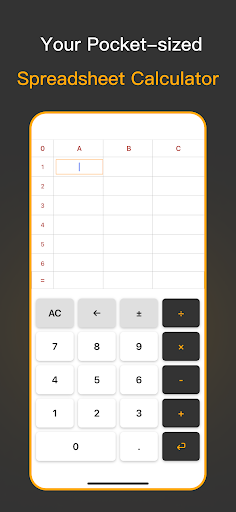


Информация о приложении CalcGrid
Источники загрузки
Device Configuration
Руководство по установке Split APK
Некоторые приложения распространяются в виде Split APK (несколько упакованных вместе файлов .apk) для оптимизации ресурсов. Стандартные установщики Android не могут их открыть.
Что нового в CalcGrid
Optimized the result display logic
О приложении CalcGrid
CalcGrid: A Structured Vertical Table Calculator for Life, Work, and Study
CalcGrid isn’t just a basic calculator—it’s a smart, structured, and intuitive vertical table calculator designed to bring clarity and order to your daily calculations. Inspired by the layout of Excel, CalcGrid displays your entire calculation process in a vertical column format, making every step visible and editable. Instead of struggling with long, hard-to-read single-line formulas, you can now manage your math as clearly as writing it on paper.
CalcGrid is built for real-world usage—not just quick math but multi-step, continuous, and revisable calculations. Whether you’re tracking expenses, solving math problems, or preparing a budget, it gives you the simplicity of a calculator with the structure of a spreadsheet, all in a mobile-optimized design.
Core Features
• Vertical Table Layout
Input numbers and operators in a clean column layout. Just like writing on paper—clear, easy, and organized.
• Step-by-step Calculation Display
Every number, operator, and result appears in its own cell. Perfect for reviewing, correcting, or validating your logic.
• Smart Input Handling
The app automatically places your inputs in the correct fields (number or operator) and moves to the next cell—ideal for fast-paced entry.
• Fully Editable at Any Time
Tap on any cell to modify its content without needing to redo the entire calculation.
• Real-time Auto Calculation
As you type or make changes, the result updates immediately. No extra buttons, no repeated “equals” taps.
• No Sign-up or Ads
Lightweight, fast, distraction-free. Just download and go.
Use CalcGrid for Everyday, Professional, and Educational Needs
Everyday Life
• Shopping Calculator – Keep a running total while grocery shopping.
• Daily Expense Tracker – Record and manage your spending effortlessly.
• Bill Splitter – Easily divide restaurant or shared expenses with friends.
• Home Budget Planner – Organize your rent, utilities, and savings in one place.
Work & Business
• Business Trip Expense Calculator – Tally travel, meals, and hotel costs.
• Pricing & Profit Estimator – Enter costs and margins to quickly calculate prices.
• Small Business Ledger – Track inventory, sales, and costs with a column layout.
• Freelance Project Quotes – Build, review, and update pricing for client projects.
Learning & Education
• Math Homework Assistant – Break down complex problems step-by-step.
• Classroom Teaching Tool – Help students visualize arithmetic operations clearly.
• Student Budgeting Practice – Teach basic budgeting and money management.
Fast, Clean, and Focused
• Instant launch with zero lag
• Real-time input response
• Seamless cell editing
• Designed for touch-first devices
• Works offline—no internet required
• No ads, no clutter—just pure utility
Who Is CalcGrid For?
• Shoppers who want to tally costs on the go
• Budget-conscious users organizing monthly finances
• Freelancers quoting project costs
• Travelers recording expenses on the road
• Students solving math problems step-by-step
• Teachers and tutors guiding learners
• Anyone who finds traditional calculators limiting
Whether you’re working on personal finances, educational tasks, or business calculations, CalcGrid gives you a structured and visual way to stay organized and accurate.
Rethink How You Calculate
CalcGrid isn’t just about finding a result—it’s about understanding how you got there. Its clear table structure lets you see, adjust, and manage complex calculations with ease. If you’ve ever wished for a mobile version of Excel that’s fast, simple, and focused solely on math, this is it.
Perfect for those who love order, need flexibility, and expect more than a basic calculator can offer.
Как скачать APK CalcGrid
- Введите имя пакета
com.viadexventures.calcgridна APK Downloader. - Выберите архитектуру вашего устройства (для современных устройств рекомендуется ARM64).
- Нажмите Скачать, чтобы получить объединенный файл APK.
- Перенесите и установите APK на свое устройство Android.
- Следите за обновлениями: Регулярно посещайте APKDER.COM, чтобы искать и скачивать последние безопасные версии ваших любимых приложений.
Часто задаваемые вопросы
Да! Каждая загрузка APK, предоставляемая APKDER, проходит строгую проверку безопасности. Мы проверяем соответствие криптографической подписи APK-файла официальной подписи разработчика, гарантируя, что APK является оригинальным, нетронутым и не подвергался изменениям.
Чтобы установить его, сначала необходимо включить «Неизвестные источники» в настройках безопасности вашего Android-устройства. После загрузки APK-файла с APKDER нажмите на него, чтобы начать установку, и следуйте подсказкам на экране.
Да! Как только разработчик выпустит новую версию CalcGrid, мы выложим обновленный APK на APKDER. Вы можете просто скачать и установить новый APK поверх существующего, не теряя данные приложения.
Да. APKDER позволяет обходить географические ограничения и скачивать официальные APK-файлы напрямую, даже если приложение или игра официально недоступны в магазине вашей страны.
Стандартный APK — это один установочный файл. XAPK или Split APK содержит несколько файлов ресурсов (например, OBB-файлы или специфические файлы интерфейса). Для их установки вы можете скачать отдельные файлы или использовать приложения вроде Split APKs Installer (SAI).
Безопасность и проверка подписи
Эта загрузка APK на 100% безопасна. Мы проверяем соответствие цифровой подписи файла официальным ключам разработчика. Изменения и реклама отсутствуют.


