




Источники загрузки
Device Configuration
Руководство по установке Split APK
Некоторые приложения распространяются в виде Split APK (несколько упакованных вместе файлов .apk) для оптимизации ресурсов. Стандартные установщики Android не могут их открыть.
Что нового
1.Новая функция: настройка скорости наложения видео
2.исправление ошибок и улучшение производительности
О приложении
VivaCut is an amazing video editor & video maker. Whether you want to make a great movie or just want to share memories and fun moments with your friends, VivaCut is a perfect choice for you.
Create short videos with one click using cool effect and transition templates! VivaCut is also a professional video editing app with all the editing features. Multi-layer timeline, chroma key and green screen features help you create cinematic videos with music for YouTube, Instagram and TikTok. Want to get more likes on your social media? Download this video editor & video maker now!
Basic Video Editing
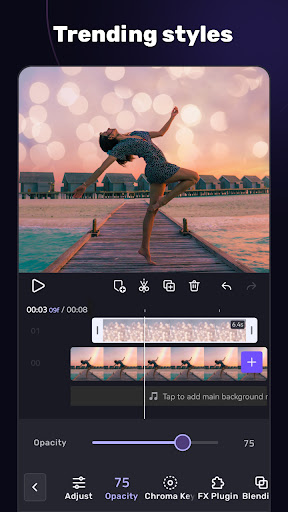
[Multi-layer timeline] An intuitive and sleek editing interface with zoom for frame-by-frame precision with overlay video editor app.
[Text] Edit, duplicate, and modify styles (variety of fonts & emoji, color, opacity, shadow, stroke).
[Trim videos] Professional tools developed for precise Video Editing App.
[Split videos] Split videos and optimize them for sharing.
[Combine video clips] Merge clips into a stunning video with transitions effects; combine video clips into one video.
[Speed Control] Fast & slow motion video like a pro, only with VivaCut Video - Pro Video Editing App!
Advanced Video Editing
[Green Screen/Chroma key] Combine/mix videos like a Hollywood-level movie. Best chroma key video editor app & video background changer editor.
[Keyframe Animation] Apply to Mask, Video Collage, Text, Stickers, Emoji, etc. Pro aesthetic video editor app.
[Mask] Linear, mirror, radial, rectangle, and oval, all for the scene. Full-screen video editor for YouTube.
[Picture in Picture] Combine clips together to create double exposures and eye-catching YouTube videos with transitions for free.
[Collage] Add pictures to your clips and edit videos, then go viral with VivaCut!
[Overlay options] Customize layers with tools such as opacity and blending.
[Blend videos] Mix videos using powerful blending modes such as Color Burn, Multiply, Screen, Soft Light, Hard Light, etc. VivaCut - best video background changer editor.
Effect & Filter & Transition
[Video Transition] Create amazing effects with cinematic overlay video editor with transition effects in VivaCut, a movie-level video background changer editor.
[Filters] Edit videos/combine video clips with adjustable filters and effects.
[Glitch Effects] Coolest video editing app with glitch effects and transitions!
Trendy Music
[Music Marker] Mark the track and add effects according to the music rhythm. Pro video editor app with music and effects.
[Audio Extraction] Aesthetic video editor with transition effects: extract music/audio from any video. Pro video editing app with sound effects.
[Templates] Create your own music videos by automatically adding unique filters and cool effects to video templates.
Save & Share
[Custom video resolution] Export videos in 720p, 1080p, and 4k.
[Rename] Rename video and mark memory with PRO aesthetic video editor.
Save videos directly with transition effects to your device's gallery, non-destructive video maker. One-click sharing to YouTube, Instagram, TikTok, Snapchat, etc.
VivaCut is a pro video editor and video editing app with all features you need! It's a video maker with music for cutting and splitting videos. Take a leap for your video and experience the next PRO video editor generation
Subscription
- Your subscription automatically renews unless auto-renew is turned off at least 24-hours before the end of the current period
- Your account will be charged for renewal within 24-hours prior to the end of the current period
Acknowledgements:
Music by audionautix.com and https://icons8.com/music/
Отзывы пользователей

приложение могло мы быть классным, если бы не премиум. Хотела заменить его вместо кк. Отзывы в тт о приложении другие, не как ожидалось. Поставила бы 1 звезду, но за практичность пусть будет 2.

Приложение с примитивнейшими функциями и фильтрами в платной версии. Хотела вернуть деньги за версию pro сразу же после покупки – разработчик не отвечает на письма, так же как и поддержка Google play. За эти деньги (2700) добавились три фильтра + еще какая-то чушь, которая есть в бесплатных версиях аналогичных приложений. Ставлю двойку за неуважение к конечному потребителю и за игнор. Приложение не стоит своих денег.

Программа работает, но при работе с видеослоями, когда я хочу на видео наложить слой другого видео или фото для красочности картинки, она вылетает и это меня разочаровало, лично я расстроен. Либо же для таких операций нужен телефон, у которого мощные характеристики для работы с объемными приложениями, либо же использовать другие видеоредакторы. Ставлю две звезды, потому что при работе с видеослоями происходит вылет, половина фильтров и переходов платные, долго запускает короткие видео в проект.

Приложение неплохое, есть шаблоны, можно монтировать, но есть минусы: водяной знак ну очень мешает, и убрать его можно только если купишь премиум, это неудобно. Половина хороших эффектов премиум, и нельзя их как-то разблокировать за рекламу, я очень расстроилась когда увидела что в отделе D3D все платно. Если что-то изменится тогда отзыв поменяю
Как скачать APK AI Video Editor - VivaCut
- Введите имя пакета
com.videoeditorpro.androidна APK Downloader. - Выберите архитектуру вашего устройства (для современных устройств рекомендуется ARM64).
- Нажмите Скачать, чтобы получить объединенный файл APK.
- Перенесите и установите APK на свое устройство Android.
- Следите за обновлениями: Регулярно посещайте APKDER.COM, чтобы искать и скачивать последние безопасные версии ваших любимых приложений.
Безопасность и проверка подписи
Эта загрузка APK на 100% безопасна. Мы проверяем соответствие цифровой подписи файла официальным ключам разработчика. Изменения и реклама отсутствуют.


