




İndirme Kaynakları
Device Configuration
Split APK Kurulum Kılavuzu
Bazı uygulamalar, kaynakları optimize etmek için Split APK'ler (birlikte paketlenmiş birden fazla .apk dosyası) olarak dağıtılır. Standart Android yükleyicileri bunları açamaz.
Yenilikler
fixed maintenance feedback issue
Bu uygulama hakkında
Never lose track of what’s in which box. Inventory Nest is a simple, powerful organiser that mirrors your physical storage: set up Locations, Boxes, and Items to catalogue everything you own. Fast search, saved filters, and QR/barcode scanning help you find any item in seconds all offline and without an account for total privacy.
Perfect for:
• Home, garage & attic organisation
• Small businesses & resellers managing stock
• Collectors, hobbyists & DIY enthusiasts
• Anyone who’s tired of forgetting what’s in which box
What you can do:
• Organised inventory: Create Locations (e.g. rooms, cupboards) and nest Boxes within them, then add Items to each box – a one-to-one mirror of your real-world storage.
• Find anything fast: Search by name, description or category. Filter items by tags, date or location, and save filter sets to reuse them in seconds.
• Detailed items: Add photos, tags and notes for each item. Track quantities, purchase dates, warranty/expiration dates, and estimated value to keep tabs on your belongings.
• QR & Barcode scanning: Generate and print QR code labels for boxes and items. Use the built-in scanner (UPC/EAN, Data Matrix, etc.) to jump straight to any item or box.
• Favourites & tasks: Star important items for quick access. Create linked to-do lists or shopping lists for tasks related to your inventory.
• Track borrowing & stock: Record who borrowed items (and when they’re due back). See low-stock and expiring items in dedicated lists to stay on top of consumables.
• Customers & orders: Manage customers, record sales and purchases, and export order history as PDF or Excel (ideal for small shops or resellers).
• Backup & restore: Export a full local backup of your inventory to your device or Google Drive for safekeeping. No account needed.
• Dark mode: Easy on the eyes in any light.
FREE features: Everything above is free. No limits on Locations, Boxes or Items. The free version includes all core organisation, search, QR/barcode, backup, favourites, to-do, change history, and business-tracking features.
Upgrade to Pro (affordable subscription) for power users:
• Kits: Group items into kits or bundles (camera kit, toolset, emergency kit).
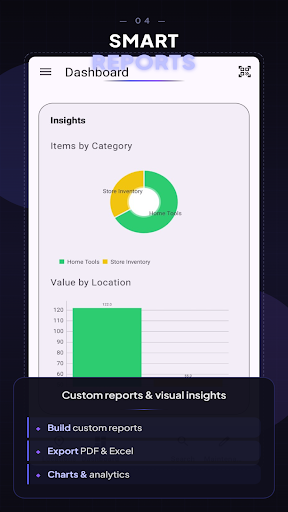
• Advanced reports & charts: Pre-built and custom reports; visualise inventory value by category or location.
• AI & OCR scanning: Identify products from photos and extract text from receipts or manuals.
• Custom fields & attachments: Add serial numbers, warranty info; attach PDFs/manuals to items.
• Proactive reminders: Schedule maintenance and get alerts for low stock, expiring items, or warranty dates.
• Cloud backup & sync: Automatic backups to your Google Drive and CSV/Excel import & PDF/HTML export.
• All future Pro features.
Get Inventory Nest and take control of your stuff, organise your entire home or business inventory with confidence!
Mobile Inventory Manager-nest APK Nasıl İndirilir
- Paket adını
com.kaadan.inventorynestAPK Downloader'da girin. - Cihazınızın mimarisini seçin (modern cihazlar için ARM64 önerilir).
- Birleştirilmiş APK dosyasını almak için İndir'e tıklayın.
- APK'yı Android cihazınıza aktarın ve yükleyin.
- Güncel Kalın: En sevdiğiniz uygulamaların en son güvenli sürümlerini aramak ve indirmek için düzenli olarak APKDER.COM'ı ziyaret edin.
Güvenlik ve İmza Doğrulaması
Bu APK indirmesi %100 güvenlidir. Dosyanın kriptografik imzasının resmi geliştirici sertifikasıyla eşleştiğini doğrularız. Herhangi bir değişiklik veya reklam barındırmaz.


