
Philips HomeRun Robot App APK Ekran Görüntüleri


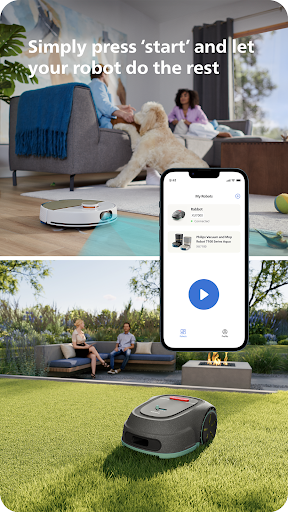

Philips HomeRun Robot App Uygulama Bilgileri
İndirme Kaynakları
Device Configuration
Split APK Kurulum Kılavuzu
Bazı uygulamalar, kaynakları optimize etmek için Split APK'ler (birlikte paketlenmiş birden fazla .apk dosyası) olarak dağıtılır. Standart Android yükleyicileri bunları açamaz.
Philips HomeRun Robot App Yenilikler
Improvements and bug fixes.
Philips HomeRun Robot App Hakkında
Unlock the full potential of your Philips HomeRun robot. Tell it exactly how and when to clean each room and mow your lawn. Then, relax.
With the Philips HomeRun Robot app you can:
● Start, pause or stop cleaning and mowing remotely
● Make a precise map of your home to clean each room in no time
● Control where your robot cleans and mows
● Choose a cleaning mode per room and mowing mode per lawn
● Set up once, enjoy spotless floors and lawns daily
● Custom clean and mow for specific situations
● Get step-by-step guidance to set up easily
● Receive progress updates on each clean and mow
● Keep your data secure
Start, pause or stop your robot remotely
Come home to clean floors and a perfect-looking garden every day by using your Philips HomeRun vacuum, mop, and lawn mowing robot in combination with the app. Set it up once—to clean each room and mow your lawn just the way you like it—touch ‘Start’, anytime, anywhere, and let your robot do the rest.
On its first run, your robot will map your floor plan and garden. Now you have an interactive map of your home that you can use to tell your robot how and when to clean each room or to monitor how your lawn is mowed. The robot vacuum cleaner can store up to five maps.
Control where your robot vacuum cleaner cleans
Only want your robot to clean the kitchen, bathroom, living room? With the app, you can tell your robot which rooms you want cleaned, and in what order. If there are areas or things you’d like it to avoid—like precious items or a rug in an area you want to mop—you can tell it where not to go, or not to mop, as well.
Choose a cleaning mode for each room and mowing mode for each lawn
Give each room unique attention with one of the cleaning modes and mowing modes for your lawn. Use Dry mode to vacuum the bedroom and Wet & Dry mode to vacuum and mop hard floors. Put your robot on Quiet mode if, say, you have a meeting, or give the kitchen an extra thorough clean by using Intensive mode. Choose a mowing mode for your lawn to get the perfect looking garden.
Set up once. Enjoy spotless floors and lawns every day
Once you’ve created a cleaning and mowing plan, clean floors and perfectly mowed lawns are always a tap away. Tap ‘Start’ when you want your robot to begin - every day if you like, and at a time that suits your schedule.
Custom clean for specific situations
Had friends over and need an extra thorough clean? Or maybe the dog left paw prints in your hallway. Again. Schedule a custom clean and mow that targets specific rooms, areas.
Get step-by-step guidance to setup easily
From connecting to Wi-Fi to the first clean and mow, we’ll guide you through every step of getting started. You’ll find easy-to-follow instructions and how-to-videos as well.
Always have support at your fingertips
Have extra questions about the HomeRun app and robot? You’ll find a user manual in the app, answers to FAQs and easy access to Customer Care if need be.
Receive progress updates
As your robot cleans and mows, you’ll receive in-app updates. See where your robot currently is in your home and what the robot mowing progress is in your garden. Check on its battery levels and, most importantly, get notified as soon as the cleaning run or mowing is done
Maintain high performance
Get the best performance from your robot by replacing parts on time. Our app lets you know when it’s time to replace parts like filters, mops, and blades, and makes it easy to order them.
Keep your data secure
Philips adheres to a strict privacy policy. We recommend creating an account to ensure you can save your preferences. If you prefer, you can use the app as a guest.
WiFi
Philips HomeRun robot vacuum cleaners have dual band Wi-Fi so they are easy to connect to your home Wi-Fi, whether it's to 2.4 or 5.0GHz. Robot lawn mowers only connect to your 2.4GHz home Wi-Fi.
Need help?
Visit www.Philips.com to find answers to our most frequently asked questions, or get in touch with our Consumer Care team.
Kullanıcı Yorumları

Ben bu üründen memnun kalmadım çünkü bu ürün güncellemesi yok servisini aradığımızda sorun olduğunu bize yan fırca ve filtre değiştirmenizi istediler ama değiştirme mize rağmen hala sorun çözülmedi yani ilgi sıfır ve ürün çok iyi temizleniyor memnun değiliz servis fırça ve filtre çok pahalı almanızı önermem...

uygulama ilkte harita seçmeme rağmen başlat yazısı aktif değildi , basılamıyordu. sonra uygulamayı sildim tekrar yükledim bu seferde uygulamaya şifre ve kullanıcı adını yazıyorum ancak giriş yazısı aktif olmuyor, basılmıyor

Berbat bi model, aldığımızdan beri hiç sıkıntısı bitmedi. Harita oluşturup temizliğe başlıyoruz haritanın dışındaki alanları ısrarla zorluyo sürekli halıların kenarlarına yalandan takılıp sıkıştım uyarısı veriyor. Düzenli bi rota çizemiyo bi bi köşeyi süpürüyo bi öbür köşeyi kendi kendine halının ortasında yığılıp kalıyo. Dümdüz bi yerde bile. Öncelik sırasına göre oda seçiyoruz kafasına göre süpürüyo yazılım açığı olduğunu düşünüyoruz.

robotun toz torbasını değiştirdiğim halde dolu değiştirin uyarısı veriyor. toz torbasi bomboş üstelik uygulamadan sipariş verdim uygun olmaması gibi bir durum da söz konusu degil tüm filtreler hazne her bölüm temizledim resetledim başka ne yapabilirim acaba. içini elim boşaltmak zorunda kalıyorum
Philips HomeRun Robot App APK Nasıl İndirilir
- Paket adını
com.philips.da.philipsrobotAPK Downloader'da girin. - Cihazınızın mimarisini seçin (modern cihazlar için ARM64 önerilir).
- Birleştirilmiş APK dosyasını almak için İndir'e tıklayın.
- APK'yı Android cihazınıza aktarın ve yükleyin.
- Güncel Kalın: En sevdiğiniz uygulamaların en son güvenli sürümlerini aramak ve indirmek için düzenli olarak APKDER.COM'ı ziyaret edin.
Sıkça Sorulan Sorular
Evet! APKDER tarafından sağlanan her APK indirme işlemi sıkı güvenlik doğrulamasından geçer. APK dosyasının şifreleme imzasının geliştiricinin resmi imzasıyla eşleştiğini doğrularız, böylece APK'nın orijinal, el değmemiş ve her türlü değişiklikten uzak olduğundan emin oluruz.
Yüklemek için öncelikle Android cihazınızın güvenlik ayarlarından "Bilinmeyen Kaynaklar" seçeneğini etkinleştirmeniz gerekir. APK dosyasını APKDER'den indikten sonra, yüklemeyi başlatmak için dosyaya dokunun ve ekrandaki talimatları izleyin.
Evet! Geliştirici Philips HomeRun Robot App için yeni bir sürüm yayınlar yayınlamaz, güncellenmiş APK'yı APKDER'de paylaşacağız. Uygulama verilerinizi kaybetmeden yeni APK'yı mevcut olanın üzerine indirip kurabilirsiniz.
Evet. APKDER, uygulama veya oyun ülkenizin mağazasında resmi olarak mevcut olmasa bile, coğrafi kısıtlamaları aşmanıza ve resmi APK dosyalarını doğrudan indirmenize olanak tanır.
Standart bir APK tek bir kurulum paketidir. XAPK veya Bölünmüş (Split) APK ise birlikte paketlenmiş birden fazla kaynak dosyası içerir. Bunları kurmak için bölümleri tek tek indirebilir veya Split APKs Installer (SAI) gibi yardımcı araçları kullanabilirsiniz.
Güvenlik ve İmza Doğrulaması
Bu APK indirmesi %100 güvenlidir. Dosyanın kriptografik imzasının resmi geliştirici sertifikasıyla eşleştiğini doğrularız. Herhangi bir değişiklik veya reklam barındırmaz.


