

Bose SoundTouch APK 截图




Bose SoundTouch 应用信息
下载来源
Device Configuration
Bose SoundTouch 的历史版本
Split APKs Installation Guide
某些应用以 Split APKs(打包在一起的多个 .apk 文件)形式分发以优化资源。标准的 Android 安装程序无法打开它们。
Bose SoundTouch 新版变化
- Fixed bugs and did some general cleaning up under the hood.
关于此应用 Bose SoundTouch
Experience your favorite music from one or many SoundTouch® speakers, with the SoundTouch® app. SoundTouch® is a family of wireless speakers for your home that play the same music throughout, or different music in different rooms.
SPEED TO MUSIC
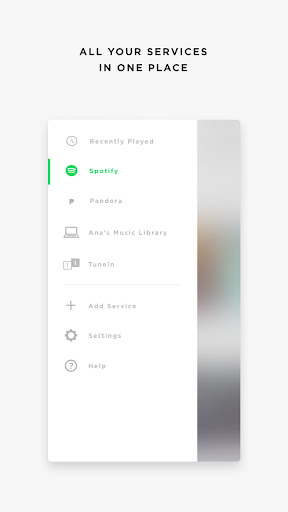
It’s faster than ever to browse and play the music you love from Spotify®, Pandora®, Amazon Music, TuneIn, SiriusXM, iHeartRadio™, Deezer and more, all from within the new SoundTouch® app.
ONE-TOUCH DISCOVERY
Personalize your home with “living” presets like Spotify’s “Discover Weekly” or Pandora’s “Thumbprint Radio.” Always have a fresh list of favorites a touch away, without having to even find your phone.
MORE STATIONS, MORE FUN
Effortlessly stream more than 100,000 radio stations from around the world with TuneIn. Check out tastemaker-curated playlists, live sports, concerts, 24/7 news coverage and great podcasts in every genre.
YOUR OLD STANDARDS
Have a library of your favorite albums and artists? Connect your laptop or NAS drive to have access to your stored music libraries.
TOTAL CONTROL
Play the same music throughout your home with “Play Everywhere,” or listen to different music in different areas, it’s up to you. The SoundTouch® app lets you control one or multiple SoundTouch® speakers in your home, from any room.
Privacy Policy
https://worldwide.bose.com/privacypolicy
California Privacy Notice of Collection
https://www.bose.com/en_us/legal/california_privacy_notice_of_collection.html
用户评论

App,已经很完善了,设置起来确实是很方便了,第二代到第三代都有用过,感觉改进了很多,设置方便了太多!众所周知的原因,希望能够在中文电台方面能够进一步完善,听到更多地国内电台,可以让海内外华人使用者能够更方便,现在国内广播电台基本听不到,盼改进!加油bose👍👍

最新固件更新后解决了此前部分电台不能播放的bug,但是每次APP似乎要先走国内线路再走国外线路,这样就每次都首先变成国内阉割版。只能先打开VPN,再开APP才全功能正常收听。SoundTouch上直接播放没问题。建议开发者要改一改APP的节点IP判断逻辑了,不然很难用。
毫无通知的情况下,一打开软件之后显示“预设功能将无法在您的地区使用”,音箱的网络功能等于彻底被删掉了,只能通过蓝牙听歌,非常糟糕。希望厂商改进,完全没有享受的服务

稳定、电台节目源多。但如果一定要我指出有不足的地方,就是和sonos比较,其合作的平台比较少,比如YouTube music就不能放。
如何下载 Bose SoundTouch APK
- 在 APK Downloader 输入应用包名
com.bose.soundtouch。 - 选择您的设备架构(现代设备推荐选择 ARM64)。
- 点击 下载 获取合并后的 APK 文件。
- 传输并安装 APK 到您的 Android 设备上。
- 保持更新: 定期访问 APKDER.COM 以搜索并下载您最喜爱的应用的最新安全版本。
常见问题
是的!APKDER 提供的每次 APK 下载都经过严格的安全验证。我们验证 APK 文件的加密签名是否与开发者的官方签名匹配,确保 APK 是原始且未经修改的。
要安装它,您首先需要在 Android 设备的安全设置中启用“未知来源”。从 APKDER 下载 APK 文件后,点击它开始安装,并按照屏幕提示操作。
是的!一旦开发者发布 Bose SoundTouch 的新版本,我们就会在 APKDER 上更新并发布。您只需下载并覆盖安装新的 APK,无需删除旧版本,也不会丢失应用数据。
是的。APKDER 允许您绕过地域限制并直接下载官方 APK 文件,即使该应用或游戏在您所在国家/地区物商店中未正式上架。
标准 APK 是单个安装包。而 XAPK 或 Split APK 则包含打包在一起 of 多个资源文件(如 OBB 扩展数据包或特定于设备的布局部件)。要安装它们,您可以单独下载拆分的包,或使用 Split APKs Installer (SAI) 等辅助工具。
安全与签名验证
此 APK 下载 100% 安全。我们验证文件的加密签名与官方开发者的凭据相匹配。无任何修改或广告注入。


