
PrinterShare Mobile Print APK 截图



PrinterShare Mobile Print 应用信息
下载来源
Device Configuration
PrinterShare Mobile Print 的历史版本
| Version | Size | Min OS | Architecture | Release Date | Action |
|---|---|---|---|---|---|
| v11.24.0 | 1.7 MB | Android 16+ | Jun 29, 2026 | Download |
Split APKs Installation Guide
某些应用以 Split APKs(打包在一起的多个 .apk 文件)形式分发以优化资源。标准的 Android 安装程序无法打开它们。
PrinterShare Mobile Print 新版变化
bug fixes
关于此应用 PrinterShare Mobile Print
Print directly from Android phone or tablet to almost any printer! Print photos, emails, documents (including PDF, Microsoft® Word, Excel®, PowerPoint®, and other files), bills, invoices, messages, web pages, and more. PrinterShare makes printing easy and convenient whether your printer is right next to you or across the world!
IMPORTANT: Some of the features are NOT FREE! To unlock these features, you would need to make a purchase to unlock the Premium Features of the free app. We highly recommend printing the test page to ensure compatibility with your printer prior to making a purchase.
NOTE: Due to the update to the Permissions policy on Google Play, we had to remove the SMS and Call log printing features from our app.
With PrinterShare you can easily print images and photos (JPG, PNG, GIF), emails (from Gmail) and attachments (PDF, DOC, XLS, PPT, TXT), contacts, agenda, web pages (HTML), and other digital content from device memory, cloud storage providers such as Google Drive, One Drive, Box, Dropbox and other applications using Share action. You even can print text messages for trial or legal matters!
Print UPS shipping labels directly from a browser on your device to supported thermal printers by logging into the UPS website.
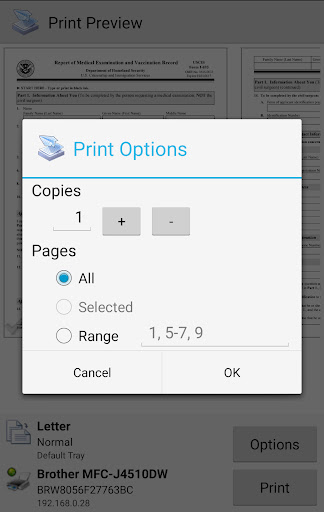
Also, you can configure many printing options such as paper size, page orientation, copies, page range, one- or two-sided printing (duplex mode), print quality (resolution), color or monochrome, media tray, and more.
With the free version of the app, you can:
* Print with certain restrictions on nearby wireless (WiFi, Bluetooth) and direct USB OTG connected printers;
* Print on Windows shared (SMB/CIFS) or Mac shared printers;
Premium Features include:
* Unlimited Nearby direct printing (PDFs, documents, photos, and more) via Wi-Fi or Bluetooth without a computer;
* Complimentary 100 pages for Remote Printing under the same account
PrinterShare supports a wide variety of HP, Canon, Brother, Kodak, Samsung, Dell, Ricoh, Lexmark, Kyocera, OKI, and other printers including legacy networkable. A full list of supported printers available at http://printershare.com/help-mobile-supported.sdf. You can also print to unsupported and legacy printers with our free computer software for Mac and Windows available at http://printershare.com.
Here is the list of printers supported by the PrinterShare app:
http://www.printershare.com/help-mobile-supported.sdf
Make sure that your printer is supported.
Please note:
1) Requested permissions are needed to print content and are not used to collect your personal data. For a more detailed explanation please see our FAQ at http://www.printershare.com/help-mobile-faq.sdf
2) If something isn't working as expected, please send us an email to [email protected]
Have a good print!
P.S. For direct nearby printing to selected printer models PrinterShare downloads and uses drivers provided by HPLIP (http://hplipopensource.com) and GutenPrint (http://gimp-print.sourceforge.net). These drivers are distributed under GNU General Public License, version 2.
用户评论

带走数字签名的pdf 无法打印数字签名的内容。

这个PrinterShare打印机很好打印不像HP的名字都很难打印出来。 这种的还可以选择自己的需求。 就比如纸尺寸颜色 大小等等。。。 我自己感觉到不错可以使用手机来打印。 一个字赞。 就是本身没有电脑的话会比较麻烦,如果里面 WiFi号码和用户名跑掉就很麻烦了。 我之前就尝试过一次。 所以在这里提醒大家比较安全。。。现在更新后 比较没划算了。 打印的时候要付款了。 还好一年的价钱不是很贵Rm7.45, 如果是每个月的话比较没法算Rm1.45 算起来的话一年很贵。 之前很爽免费给你们打印现在要收费真的是 太骗人了。 我下载很多软件APP打印都不能够用 都是要收费的。 现在很烂但是打印很方便。

远程打印需要使用付费服务器,但是本地打印可以用,手机上成功配置了,没什么难度,效果不错

无法随意调整文档或者图片大小,打印出来的文件或者图片与原件差距很大,打印出来相当模糊
如何下载 PrinterShare Mobile Print APK
- 在 APK Downloader 输入应用包名
com.dynamixsoftware.printershare。 - 选择您的设备架构(现代设备推荐选择 ARM64)。
- 点击 下载 获取合并后的 APK 文件。
- 传输并安装 APK 到您的 Android 设备上。
- 保持更新: 定期访问 APKDER.COM 以搜索并下载您最喜爱的应用的最新安全版本。
常见问题
是的!APKDER 提供的每次 APK 下载都经过严格的安全验证。我们验证 APK 文件的加密签名是否与开发者的官方签名匹配,确保 APK 是原始且未经修改的。
要安装它,您首先需要在 Android 设备的安全设置中启用“未知来源”。从 APKDER 下载 APK 文件后,点击它开始安装,并按照屏幕提示操作。
是的!一旦开发者发布 PrinterShare Mobile Print 的新版本,我们就会在 APKDER 上更新并发布。您只需下载并覆盖安装新的 APK,无需删除旧版本,也不会丢失应用数据。
是的。APKDER 允许您绕过地域限制并直接下载官方 APK 文件,即使该应用或游戏在您所在国家/地区物商店中未正式上架。
标准 APK 是单个安装包。而 XAPK 或 Split APK 则包含打包在一起 of 多个资源文件(如 OBB 扩展数据包或特定于设备的布局部件)。要安装它们,您可以单独下载拆分的包,或使用 Split APKs Installer (SAI) 等辅助工具。
安全与签名验证
此 APK 下载 100% 安全。我们验证文件的加密签名与官方开发者的凭据相匹配。无任何修改或广告注入。


