

ChromaFusion Launcher - Themes APK 截图


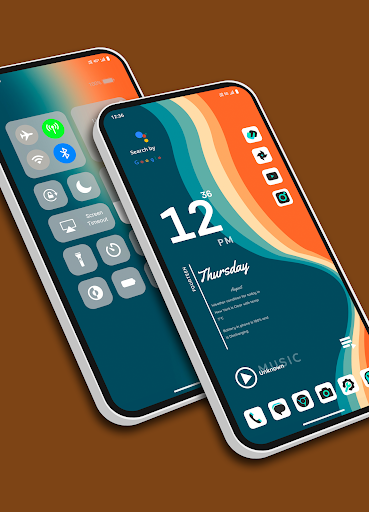


ChromaFusion Launcher - Themes 应用信息
下载来源
Device Configuration
Split APKs Installation Guide
某些应用以 Split APKs(打包在一起的多个 .apk 文件)形式分发以优化资源。标准的 Android 安装程序无法打开它们。
ChromaFusion Launcher - Themes 新版变化
Bug fixed.
关于此应用 ChromaFusion Launcher - Themes
Transform your Android device's home screen with the Chroma Fusion Launcher and experience the allure of the chroma fusion theme like never before! Dive into a world of unique and customizable widgets that will elevate your smartphone experience to a whole new level.
🌌 Key Features 🌌
1. **Stunning Wallpapers**: Choose from wallpapers within the launcher. Plus, you have the freedom to apply wallpapers from your gallery to create a unique look.
2. **Unique Themes and Widgets**: Explore 18 meticulously crafted themes, each designed with focused frame and unique wallpapers and widgets that perfectly complement your style.
3. **Icon Pack Variety**: Tailor your device's look with ease by switching between 43 unique icon packs. Customize the color and padding of select packs for a truly personalized touch.
4. **Personalized Home Screen**: Arrange your icons and widgets to create a home screen that truly reflects your personality and preferences.
5. **Effortless Folder Creation**: Create folders easily by dragging and dropping apps, customize them with a long press, and choose between large or small grid layouts for folder.
6. **Intuitive Drag and Drop**: Bring more apps to your home screen by intuitively dragging and dropping them for quick access.
7. **Versatile App List**: Enjoy the convenience of two app list formats—grid and list view—both featuring alphabetized index search and regular search options.
8. **Instant Notification Counts**: Stay on top of your notifications with a quick glance at the app icons, which display the notification count for a faster response.
9. **Versatile Widgets**: Choose from a variety of widgets, including calendar, clock, digital clock, weather, greetings, and more, with 15+ options to enhance your home screen. You can resize each and every widget, you can also apply system widgets.
10. **Customizable Weather Forecast**: Select your preferred city for weather forecasts and stay informed about the conditions that matter to you.
18. **Flexible Font Sizes**: Customize your text by choosing from three font sizes—small, medium, or large—to suit your visual preferences.
12. **App Privacy**: Maintain your privacy by hiding specific apps from the app list. Easily access hidden apps in the settings under the "Hidden Apps" section.
13. **App Lock Feature**: Keep your sensitive apps secure with our built-in app locking feature. Set up a password to safeguard your apps from unauthorized access.
14. **Control Center**: Access Control Center by swiping down on the main screen. Easily control music playback and quickly toggle various settings.
Download the Chroma Fusion Launcher now and embark on a journey of unparalleled customization, aesthetics, and functionality for your Android device. Upgrade your home screen and unlock a world of possibilities today!
用户评论

这款启动器最大的优势就是不需要自己设置太多东西,本身的主题就挺好看。然后采用只用下半部分放置app的形式,能够欣赏美图。 缺点是第一次设置app很麻烦,其次,没有名称,看图标,很难猜,除非长期使用不然不好找软件。

唯一缺点 下来屏幕控制中心无法关闭 希望做一个开关 让用户自己选择

good 👍
如何下载 ChromaFusion Launcher - Themes APK
- 在 APK Downloader 输入应用包名
com.lwsipl.chromafusion.launcher。 - 选择您的设备架构(现代设备推荐选择 ARM64)。
- 点击 下载 获取合并后的 APK 文件。
- 传输并安装 APK 到您的 Android 设备上。
- 保持更新: 定期访问 APKDER.COM 以搜索并下载您最喜爱的应用的最新安全版本。
常见问题
是的!APKDER 提供的每次 APK 下载都经过严格的安全验证。我们验证 APK 文件的加密签名是否与开发者的官方签名匹配,确保 APK 是原始且未经修改的。
要安装它,您首先需要在 Android 设备的安全设置中启用“未知来源”。从 APKDER 下载 APK 文件后,点击它开始安装,并按照屏幕提示操作。
是的!一旦开发者发布 ChromaFusion Launcher - Themes 的新版本,我们就会在 APKDER 上更新并发布。您只需下载并覆盖安装新的 APK,无需删除旧版本,也不会丢失应用数据。
是的。APKDER 允许您绕过地域限制并直接下载官方 APK 文件,即使该应用或游戏在您所在国家/地区物商店中未正式上架。
标准 APK 是单个安装包。而 XAPK 或 Split APK 则包含打包在一起 of 多个资源文件(如 OBB 扩展数据包或特定于设备的布局部件)。要安装它们,您可以单独下载拆分的包,或使用 Split APKs Installer (SAI) 等辅助工具。
安全与签名验证
此 APK 下载 100% 安全。我们验证文件的加密签名与官方开发者的凭据相匹配。无任何修改或广告注入。


