下载来源
Device Configuration
Split APKs Installation Guide
某些应用以 Split APKs(打包在一起的多个 .apk 文件)形式分发以优化资源。标准的 Android 安装程序无法打开它们。
新版变化
Bug fixes
关于此应用
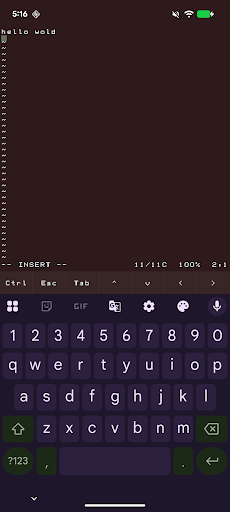
abash is a native Android terminal emulator written in C. It gives you a real interactive bash shell on your phone, complete with a VT100 terminal, scrollback, command history, tab completion, and a soft-key toolbar for Ctrl, Esc, Tab, and arrow keys.
It also ships with a practical Unix toolset, including vim, git, curl, grep, sed, awk, find, tar, less, and a large set of GNU command-line tools. You can edit text files, inspect and transform data, work with repositories, and run shell workflows directly on-device.
abash also includes Android-aware commands for things like the clipboard, share sheet, notifications, camera, sensors, and selected device information when you grant permission. It is designed to feel like a real shell while still fitting naturally into Android.
When you choose abash from Android’s Open with menu, text files can open directly in vim. Other shared items can open a shell that is already navigated to the item’s parent folder, so you can start working immediately. As a fallback, if it cannot access the file's source directory, abash will copy the file into its home directory.
Important limitations
abash still runs inside Android’s app sandbox. It is not root, not a Linux VM, and not a way around Android security. It cannot read other apps’ private data, modify protected system areas, or access files that you have not explicitly shared or granted permission to.
Some parts of the system are also restricted by Android and SELinux. That means certain directories may not be fully discoverable, and some convenience features such as command or path discovery can be more limited than on a desktop Linux system.
For files opened through Android document providers, abash may need to make a private working copy so terminal tools can access it. In those cases, saving changes updates the copy inside abash rather than automatically writing back to the original source file.
如何下载 abash APK
- 在 APK Downloader 输入应用包名
dev.paonessa.abash。 - 选择您的设备架构(现代设备推荐选择 ARM64)。
- 点击 下载 获取合并后的 APK 文件。
- 传输并安装 APK 到您的 Android 设备上。
- 保持更新: 定期访问 APKDER.COM 以搜索并下载您最喜爱的应用的最新安全版本。
安全与签名验证
此 APK 下载 100% 安全。我们验证文件的加密签名与官方开发者的凭据相匹配。无任何修改或广告注入。