

PrinterShare Mobile Print APK Screenshots



PrinterShare Mobile Print App Information
Download Sources
Device Configuration
Old Versions of PrinterShare Mobile Print
| Version | Size | Min OS | Architecture | Release Date | Action |
|---|---|---|---|---|---|
| v11.24.0 | 1.7 MB | Android 16+ | Jun 29, 2026 | Download |
Split APKs Installation Guide
Some apps are distributed as Split APKs (multiple .apk files packaged together) to optimize resources. Standard Android installers cannot open them.
What's New in PrinterShare Mobile Print
bug fixes and improvements
About PrinterShare Mobile Print
Print directly from Android phone or tablet to almost any printer! Print photos, emails, documents (including PDF, Microsoft® Word, Excel®, PowerPoint®, and other files), bills, invoices, messages, web pages, and more. PrinterShare makes printing easy and convenient whether your printer is right next to you or across the world!
IMPORTANT: Some of the features are NOT FREE! To unlock these features, you would need to make a purchase to unlock the Premium Features of the free app. We highly recommend printing the test page to ensure compatibility with your printer prior to making a purchase.
NOTE: Due to the update to the Permissions policy on Google Play, we had to remove the SMS and Call log printing features from our app.
With PrinterShare you can easily print images and photos (JPG, PNG, GIF), emails (from Gmail) and attachments (PDF, DOC, XLS, PPT, TXT), contacts, agenda, web pages (HTML), and other digital content from device memory, cloud storage providers such as Google Drive, One Drive, Box, Dropbox and other applications using Share action. You even can print text messages for trial or legal matters!
Print UPS shipping labels directly from a browser on your device to supported thermal printers by logging into the UPS website.
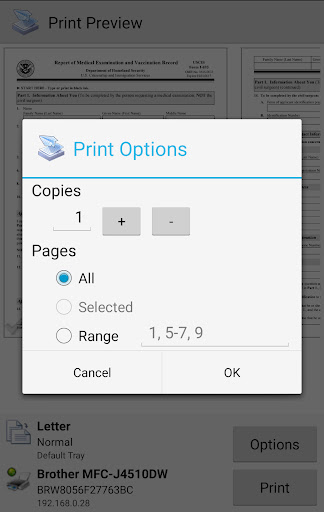
Also, you can configure many printing options such as paper size, page orientation, copies, page range, one- or two-sided printing (duplex mode), print quality (resolution), color or monochrome, media tray, and more.
With the free version of the app, you can:
* Print with certain restrictions on nearby wireless (WiFi, Bluetooth) and direct USB OTG connected printers;
* Print on Windows shared (SMB/CIFS) or Mac shared printers;
Premium Features include:
* Unlimited Nearby direct printing (PDFs, documents, photos, and more) via Wi-Fi or Bluetooth without a computer;
* Complimentary 100 pages for Remote Printing under the same account
PrinterShare supports a wide variety of HP, Canon, Brother, Kodak, Samsung, Dell, Ricoh, Lexmark, Kyocera, OKI, and other printers including legacy networkable. A full list of supported printers available at http://printershare.com/help-mobile-supported.sdf. You can also print to unsupported and legacy printers with our free computer software for Mac and Windows available at http://printershare.com.
Here is the list of printers supported by the PrinterShare app:
http://www.printershare.com/help-mobile-supported.sdf
Make sure that your printer is supported.
Please note:
1) Requested permissions are needed to print content and are not used to collect your personal data. For a more detailed explanation please see our FAQ at http://www.printershare.com/help-mobile-faq.sdf
2) If something isn't working as expected, please send us an email to [email protected]
Have a good print!
P.S. For direct nearby printing to selected printer models PrinterShare downloads and uses drivers provided by HPLIP (http://hplipopensource.com) and GutenPrint (http://gimp-print.sourceforge.net). These drivers are distributed under GNU General Public License, version 2.
User Reviews

Installed and set up this program on my phone, and printed the test page. but when I was ready to print a one-page document, my whole reason for installing this app and the driver pack it needed, I was unable to print without inserting money. not even one lousy page! No free trial, no print and few pages to see if you like it, nothing!

Downgraded from 5 star to 1 - it used to be free, and had limits on printing without paying, & time between prints - fair. Now, they updated it, and made it so you can't print anything, at all, without paying... Silently, no mention of this change, installed the update to find this out. Deleted, will have to find a different printing app. Very unfortunate, I'd rather have a few ads and print free as before. Old review-Amazing app. Works great every time. Support for so many printers also!Thanks!

I couldn't find any app that would print from my phone. I literally tried 5 different apps. Thankfully I found this app. Its so simple and right to the point with everything. I recommend paying for the subscription it's definitely worth it. I can download the app from any device with my Google account and print anything I need with No problems at all. If you're having trouble printing from your device using other apps, give this one a try, it should work. I know for me it does at least.

This used to be good, but now you can only use it if you pay! No ads, No more wait time between Printing, now it is only usable if you pay for a master key/premium account! BUT they don't freely tell you that it is now only a paid app before or after you download, they hide that info until you go to print and then don't understand why it is not printing! Ridiculous and total waste of time! Pro: set up is easy.
How to Download PrinterShare Mobile Print APK
- Enter the package name
com.dynamixsoftware.printershareon the APK Downloader. - Select your device architecture (ARM64 recommended for modern devices).
- Click Download to get the merged APK file.
- Transfer and install the APK on your Android device.
- Keep Updated: Visit APKDER.COM regularly to search for and download the latest secure versions of your favorite apps.
Frequently Asked Questions
Yes! Every APK download provided by APKDER undergoes rigorous security verification. We verify that the cryptographic signature of the APK file matches the official signature from the developer, ensuring the APK is original, untouched, and free from any modifications.
To install it, you first need to enable "Unknown Sources" in your Android device's security settings. After downloading the APK file from APKDER, tap it to begin the installation and follow the on-screen prompts.
Yes! As soon as the developer releases a new version of PrinterShare Mobile Print, we will update and provide the updated APK on APKDER. You can simply download and install the new APK over the existing installation without losing your app data.
Yes. APKDER allows you to bypass geographic restrictions and download official APK files directly, even if the app or game is not officially available in your country's store.
A standard APK is a single installation package. An XAPK or Split APK contains multiple resource files (like OBB expansions or device-specific layout parts) packaged together. To install them, you can download splits individually or use dynamic helper tools like Split APKs Installer (SAI).
Security & Signature Verification
This APK download is 100% safe. We verify that the cryptographic signature of the file matches the official developer credentials. No modifications or adware are injected.


