

Hang Seng Invest Express APK Screenshots



Hang Seng Invest Express App Information
Download Sources
Device Configuration
Split APKs Installation Guide
Some apps are distributed as Split APKs (multiple .apk files packaged together) to optimize resources. Standard Android installers cannot open them.
What's New in Hang Seng Invest Express
Minor enhancements and improved stability
About Hang Seng Invest Express
Conduct online trading of stocks listed in 3 stock markets with ease
- Provides a one-stop solution to trade HK stocks, A shares and US stocks
-Trade US stocks online by submitting Substitute Form W-8BEN in-app
Simply trade securities with SimplyStock for investors aged 18-30
- Trade HK stocks, A-shares, US stocks freely with just a monthly fee of HKD30
- $0 brokerage fee
- No trade, no fee
Seize the opportunity and apply for IPO
- IPO function with IPO financing service is available. Apply for an IPO in just 3 steps. Track the market response and stock performance after listing.
Safe method to logon
- Fast logon process on existing Hang Seng e-Banking users with ONE credential and soft token across all digital channels, including Mobile Security Key or biometric authentication.
Instant Order Placement
- Quick Buy function helps place order in 4 simple inputs.
Grab golden opportunity at ease
- Provide effortless synchronization of traders' Watchlist across all Hang Seng platforms, ensure you to keep abreast of market trends.
Detailed quotes at one glance
- Search your stocks by stock number or name, display interactive charts and order searches.
Calculate the profit and loss in real-time
- Allow real-time portfolio management and calculation on profit and loss statement.
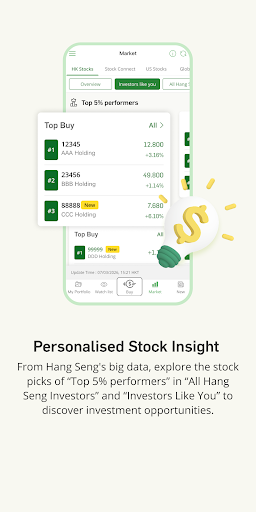
Personalized for building your wealth
- Display relevant news based on your watch list and portfolio, plus special analysis of Hang Seng Investment Manager and other market experts.
More functions to come, stay tuned! Learn more from "Hang Seng Invest Express" website: http://www.hangseng.com/investex
Remark: To use "Hang Seng Invest Express", you have to first own a securities account.
Disclaimer:
This App is provided by Hang Seng Bank Limited (the “Bank”, or “we”). The Bank is regulated and authorised to carry out banking activities in Hong Kong SAR. The products and services represented within this App are intended for Hong Kong customers.
This App is not intended for distribution, download or use by any person in any jurisdiction, country or region where the distribution, download or use of this material is restricted and would not be permitted by law or regulation. If you are outside of Hong Kong, we may not be authorised to offer or provide you with the products and services available through this App in the country or region you are located or resident in.
Hang Seng of 83 Des Voeux Road, Central, Hong Kong is incorporated in Hong Kong with limited liability.
Please be aware that Hang Seng is not authorised or licensed in any other jurisdiction for the provision of the services and/or products available through Invest Express. We cannot guarantee that the services and products available through Invest Express are authorised to be offered in any other jurisdiction.
Invest Express is not intended for download or use by any person in any jurisdiction where such download or use would not be permitted by law or regulation of such jurisdiction. The information provided through Invest Express is not intended for use by persons located in or resident in jurisdictions where the distribution of such material may be considered marketing or promotional and where that activity is restricted.
User Reviews

So many problems. First, what trading app does not even display your portfolio profit/loss? This is so basic, yet only quantity and market value are displayed. Second, it's so buggy. The screen is 'split' top / bottom, and scrolling down is so troublesome getting to the right place, and sometimes the entire screen 'flickers' and moves up and down very rapidly. Annoying. Third, when you click in on quote, it then triggers a chargeable quote automatically. Not transparent at all.

The login procedure is too slow, won't use this app to invest in day trading. Speed is very very very important for day-trader. Please improve it asap, otherwise I will report to HKMA and SEC.

7 Sep 24 version is supposed to improve stability. Too bad, I can't even open the app after I was forced to upgrade to this rubbish version.

The portfolio is incorrect. It scared me until I find my stocks in the banking app. This is feeling worse than losing money.
How to Download Hang Seng Invest Express APK
- Enter the package name
com.hangseng.invexon the APK Downloader. - Select your device architecture (ARM64 recommended for modern devices).
- Click Download to get the merged APK file.
- Transfer and install the APK on your Android device.
- Keep Updated: Visit APKDER.COM regularly to search for and download the latest secure versions of your favorite apps.
Frequently Asked Questions
Yes! Every APK download provided by APKDER undergoes rigorous security verification. We verify that the cryptographic signature of the APK file matches the official signature from the developer, ensuring the APK is original, untouched, and free from any modifications.
To install it, you first need to enable "Unknown Sources" in your Android device's security settings. After downloading the APK file from APKDER, tap it to begin the installation and follow the on-screen prompts.
Yes! As soon as the developer releases a new version of Hang Seng Invest Express, we will update and provide the updated APK on APKDER. You can simply download and install the new APK over the existing installation without losing your app data.
Yes. APKDER allows you to bypass geographic restrictions and download official APK files directly, even if the app or game is not officially available in your country's store.
A standard APK is a single installation package. An XAPK or Split APK contains multiple resource files (like OBB expansions or device-specific layout parts) packaged together. To install them, you can download splits individually or use dynamic helper tools like Split APKs Installer (SAI).
Security & Signature Verification
This APK download is 100% safe. We verify that the cryptographic signature of the file matches the official developer credentials. No modifications or adware are injected.


