



Download Sources
Device Configuration
Split APKs Installation Guide
Some apps are distributed as Split APKs (multiple .apk files packaged together) to optimize resources. Standard Android installers cannot open them.
What's New
App Store age verification support.
About this app
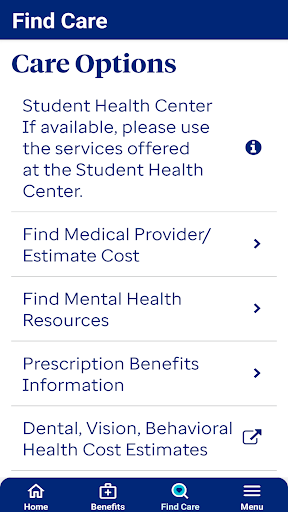
The Student Resources mobile app is for college students who have enrolled in their college/university’s student health insurance plan. With the UHCSR app, students can access their ID card, explore Care Options, search for in-network providers and view claims.
**The UHCSR app is only accessible if you are enrolled in a Student Resources health plan. If you are enrolled in a UnitedHealthcare plan through your employer, please download the Health4Me app.
Features:
• Create My Account – Create your online account directly from your phone.
• ID Cards – View, fax or email your ID card directly to your provider or save a copy to your device for quick access later; covered dependents are also included.
• Provider Search – Search for In-Network participating Healthcare providers; quickly call the office or facility and view their location on a map.
• Find My Claims – View claims received within the past 120 days for both the primary insured and covered dependents.
• Care Options – Review the care options available to you, based on your policy benefits; easily reach out and get the support you need.
• Customer Service – Easy access to email or call Customer Service.
User Reviews

Plainly, this app just doesn't work. Just like their mobile site, it's garbage. None of the drop-down menus to "Select member" work, so I can't access anything because I can't select the member I want to access it for. This is no surprise to me, though, because the website has always been a mess and currently, it takes me into an infinite redirect loop when I sign in. What a disaster and a shame...it's infuriating to know the chunk we pay for insurance got blown on this.

The app no longer works. Upon opening there is now a single screen saying "Security Warning: Rooted/Jailbroken device detected. Version: 6.0.23" with seemingly no way to do anything else. 1. My device is not rooted. 2. Don't call it a "security WARNING" if it blocks usage of the app; that's not a warning, that's an error. If it is just a warning, there should be a way to acknowledge it and continue anyway. Note that other apps (even other UHC apps) do not think my device is rooted.

Garbage app. Can't even log in because when I try to do that, a stupid msg 'Age update required Go K to your Google Account birthday settings. Under Personal Info,1 tap Birthday, then Update and Save' appears. When tapping on the 'Play Store' button another stupid offline Play Store page appears. I have still gone ahead a manually checked age settings on my Google account and it's perfectly fine.

Many months ago the app suddenly never let me use it again. It gives the error: "Age update required. Go to your Google Account birthday settings. Under Personal Info, tap Birthday, then Update and Save." and recommends a broken link. I tried reinstalling and it never fixed the issue.
How to Download UHC Student Resources APK
- Enter the package name
com.laser2mail.uhcsrmobileon the APK Downloader. - Select your device architecture (ARM64 recommended for modern devices).
- Click Download to get the merged APK file.
- Transfer and install the APK on your Android device.
- Keep Updated: Visit APKDER.COM regularly to search for and download the latest secure versions of your favorite apps.
Security & Signature Verification
This APK download is 100% safe. We verify that the cryptographic signature of the file matches the official developer credentials. No modifications or adware are injected.


