




Download Sources
Device Configuration
Split APKs Installation Guide
Some apps are distributed as Split APKs (multiple .apk files packaged together) to optimize resources. Standard Android installers cannot open them.
What's New
1. Optimize performance
2. Fix bugs
About This App
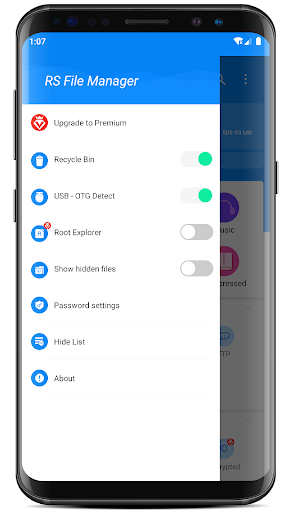
File Management app RS File Manager - RS File Explorer is the ultimate File Manager for Android.
Android 16 is supported now!
Free, Safe, Simple, Manage your files efficiently and easily with RS File Manager. RS File Manager - RS File Explorer is easy and powerful file explorer for Android devices. It's free, fast and full featured.
Manage your files like you do on your desktop or laptop using Multiple Select, Cut, Copy, Paste, Move, Create, Delete, Rename, Search, Share, Send, Hide, zip, unzip, and Bookmark etc.
With RS File Manager - RS File Explorer, you can easily manage your files and folders on your device and cloud storages. Also you can find how many files and apps you have on your device immediately after opening RS File Manager.
More Features:
● Disk Analysis : analyze your space usage, large files, file categories, recent files, folder size
● Cloud Drive access : Google Drive™, Dropbox, OneDrive, Yandex, Box, Google Shared Drive, Mega™, NextCloud
● Manage your network storages : FTP, FTPS, SFTP, WebDAV
● Local area network : SMB 2.0, NAS, CIFS, FTP, HTTP
● Efficient file search : Search for your file immediately
● App manager
● Root explorer
● Compress and Decompress : Zip, Rar, 7zip, obb
● USB OTG
● Access files from PC
● Favorite and bookmark folders or files
● Thumbnails for images and video as well as for various file types
● View APK files as ZIP
● Share - send files by Bluetooth, email, or whatever the device supports
● Easily work with Zip (as if it was normal folder)
● File Encryption : 128-bit encryption
With RS File Manager - RS File Explorer, you have 100% control over your file system and everything can be found easily organized.
Languages supported by the RS file explorer include English( en ), Arabic ( ar ), German ( de ), Spanish ( es ), French ( fr ), Italian ( it ), Portuguese ( pt ), Russian ( ru ), etc.
User Reviews

Integrated explorers are getting better and better. This is great, but $20 a year subscription is a bit much. I'd encourage people to look back to Samsung or Apple. Their explorers are much better now. Deceptive ads on free still upset me, though I am a subscriber for ftp lan and cloud access with flexible skins and small text for more info. It is a good app without any backdoors. Just turn off most permissions or 1 time them.

RS file manager is showing a pop up when I select my Apple TV connected to my HDMI input. Fortunately the pop-up has the option, to let me select the TV to manage it. I don't know if it thinks the Apple TV is a storage device connected to the HDMI. RS image viewer displays pictures very tiny. And there is no option to zoom. This is one of the few file explorers that shows my correct hard drive size as 4 GB and not 8. It handles XAPK's better than most other explorers and has done a good job backing up my settings and files. It easily has the most pleasing background color of any fire Explorer. This is on an old Sony Bravia.

Hard to use and too much spam and ads. I don't remember why I originally installed this but it's a pain to get it to do some basic things. Now they have cleverly started putting a notification in every time you install an app that offers to "analyze" your apps for you. I was curious to see what it did. Of course it just plays an ad 😂

I'm not paying a yearly subscription, for a file manager. Happy to pay a reasonable one-time cost, and will reconsider, if you make that option available. Otherwise, nope! Response to devs: I uninstalled the software, due to your requirement for a subscription. So, until that changes, I have no basis, for changing my rating.
How to Download RS File Manager File Explorer APK
- Enter the package name
com.rs.explorer.filemanageron the APK Downloader. - Select your device architecture (ARM64 recommended for modern devices).
- Click Download to get the merged APK file.
- Transfer and install the APK on your Android device.
- Keep Updated: Visit APKDER.COM regularly to search for and download the latest secure versions of your favorite apps.
Security & Signature Verification
This APK download is 100% safe. We verify that the cryptographic signature of the file matches the official developer credentials. No modifications or adware are injected.


