



Download Sources
Device Configuration
Split APKs Installation Guide
Some apps are distributed as Split APKs (multiple .apk files packaged together) to optimize resources. Standard Android installers cannot open them.
About this app
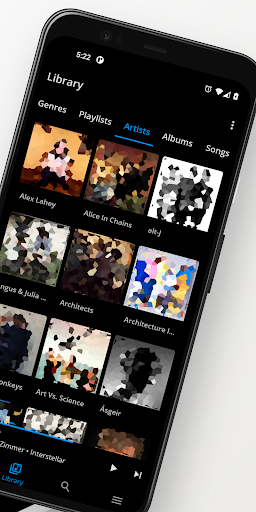
Shuttle Music Player is a modern, focused music player for your music collection
Stream your music via Jellyfin, Emby or Plex, or copy it onto your device for local playback.
Shuttle includes a built in tag editor, and offers an alternative to the often flaky Android Media Store. With Shuttle, your playlists won't go missing, and your tags will be imported correctly. A wide range of media formats are supported, and S2 ships with built in software codecs for Opus and FLAC.
Other features include:
- A custom built 10-band equalizer with frequency response graph
- Sleep timer
- Day/Night mode & themes
- Android Auto
- Chromecast
- Album shuffle
- Playlists
- Automatic artwork downloading
- Lyrics
- Modern MD2 design
I'm proud of what I've built with Shuttle. I hope you love it as much as I do!
User Reviews

I quite like it. Simple, not overly complicated. A one time purchase rather than a subscription. My only complaint is that I can't organize my playlists, as far as I can tell. I just want to alphabetize them, but they're done in the order that the music was added so my "classical" is beneath my "rock" playlist.

it's a mess of the library because everything gets jumbled together into categories of songs, genres, albums, artists, and playlists. I do not see an option for folder hierarchy view so you can browse your organized mess. if you have a very small library then it might be okay. IF you have a large library, then it's like tossing thousands of files into one folder and wanting to sort through it.

As long as you're willing to pay for it, this is the best offline music player out there, currently. The interface is simple and fast, playback works well. It doesn't destroy my battery life. Android Auto has everything I need, and doesn't have a ton of unnecessary stuff getting in the way. Resuming playback works properly. One little problem I do have is that it has an exclude option, but it won't exclude all of my WhatsApp media. One of them just sticks in my library.

I discovered Shuttle music player years ago and fell in love with it. It checked all the boxes that I needed/wanted. Can't say that I like how Shuttle+ was abandoned and the Bluetooth issues I have still persist, but when I saw this app I had to give it a try. Sure enough, it works flawlessly. Paid for it on day 4. Thank you for your hard work!
How to Download Shuttle Music Player APK
- Enter the package name
com.simplecityapps.shuttleon the APK Downloader. - Select your device architecture (ARM64 recommended for modern devices).
- Click Download to get the merged APK file.
- Transfer and install the APK on your Android device.
- Keep Updated: Visit APKDER.COM regularly to search for and download the latest secure versions of your favorite apps.
Security & Signature Verification
This APK download is 100% safe. We verify that the cryptographic signature of the file matches the official developer credentials. No modifications or adware are injected.


