


Download Sources
Device Configuration
Split APKs Installation Guide
Some apps are distributed as Split APKs (multiple .apk files packaged together) to optimize resources. Standard Android installers cannot open them.
What's New
Try our new, optional geofencing feature to create automations that run when you arrive and depart from home
About this app
Welcome to SmartRent!
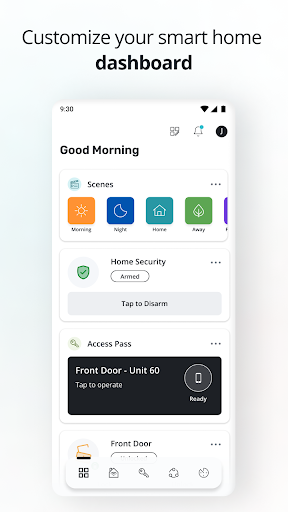
The SmartRent App, designed with your experience in mind, puts comfort, control, and convenience in the palm of your hand. With custom controls, settings and more, it makes “there’s no place like home” ring even truer.
You’ll love the ability to:
- Lock and unlock your door or adjust your thermostat from anywhere
- Create custom schedules for your thermostat to save money and energy
- Grant unique, time-bound access codes to family, friends, and service providers
- Set up automations to simplify daily routines
- Issue voice commands with Amazon Alexa and Google Assistant
- Be alerted immediately of possible leaks in your home
- Review your lock activity to see when guests or maintenance visited
- Link your Ring account for one less app to manage
- And more!
Download the SmartRent App and start customizing your smart home!
User Reviews

This app does not work! Before, the app didn't respond to any input whatsoever. Now, I can't login. If I put in the incorrect password, it will tell me that the password was wrong. I am able to send a password reset request. But, when I put in the correct password and press the login icon, the icons and the information fields turn grey, and the app virtually freezes. I have cleared the cache and data. I have Uninstalled and Reinstalled the app, but it does the same thing. Such Garbage!

The app features themselves aren't bad, it's rather convenient to some extent. But the reason for the 1 star is because I constantly have to uninstall and re-install the app in order to log in. One day it works, and the next, you just can't login. Once you put your username & password, the app just freezes and stays in the login screen forever, which is a major issue when you are trying to get into your house and don't know the code, or if you forgot to lock your doors after leaving.

You really should add a guest/renter ability in your app. It could only allow control of the door lock, lights, and thermostat with all the other features only available to the owner/leaseholder. Our apartment just got all of your stuff installed, but we can't access any of it because the leaseholder will not share their login. They would happily provide us with a more-limited login ability if you had that feature in your app

The features available are nice. You can make temporary passcodes, control your thermostat and lock remotely, and most the of standard features you'd expect. But the app is unresponsive. The app is also an incredible battery drain if you leave it open in he background. my phone has warned me multiple times of high CPU usage and I've noticed how hot my phone gets if I forget to close the app any time I want to adjust temperature in my apartment.
How to Download SmartRent APK
- Enter the package name
com.smartrent.residenton the APK Downloader. - Select your device architecture (ARM64 recommended for modern devices).
- Click Download to get the merged APK file.
- Transfer and install the APK on your Android device.
- Keep Updated: Visit APKDER.COM regularly to search for and download the latest secure versions of your favorite apps.
Security & Signature Verification
This APK download is 100% safe. We verify that the cryptographic signature of the file matches the official developer credentials. No modifications or adware are injected.


