



Download Sources
Device Configuration
Split APKs Installation Guide
Some apps are distributed as Split APKs (multiple .apk files packaged together) to optimize resources. Standard Android installers cannot open them.
What's New
The world in your hands with myPhonak Junior:
- Adjust the volume separately for each ear
- Set streaming balance for each ear
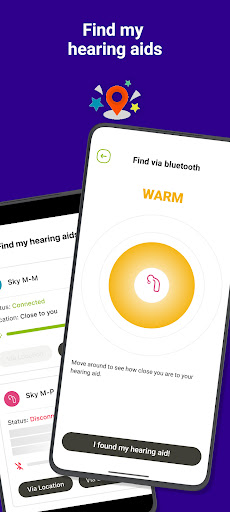
- Find your HD in case of loss
Other new features, updates and improvements:
- Custom program management (creating, updating, deleting, editing)
- Refined program management flow
- Optimized pairing flow and Bluetooth streaming
- Cleaning reminder for EasyGuard and detailed cleaning instructions
- Color theme support all over the app
About this app
The myPhonak Junior app allows you and your child to be more involved in the hearing journey in a way that fits into the child’s and the family’s needs. Working together with your hearing care professional is essential to determine which features of the app will be most beneficial.
The Remote Control function has been specially designed for children aged 6 years and above (with supervision when needed). It gives your child the ability to adjust the settings on their hearing aids to suit their listening preferences in more challenging environments. The myPhonak Junior app has been precisely designed to empower children in an age-appropriate without sacrificing hearing performance.
Remote Support* is suitable for families and children of all ages. It gives you the opportunity to stay connected with your hearing care professional remotely. Whether your child is still young and you are the main contact person, or your child is old enough to take on the responsibility for their hearing appointments, Remote Support provides the opportunity to have ‘hearing check ins’ which can be aligned with your busy lifestyle. Remote Support appointments can be combined with clinic appointments to provide minor adjustments to the hearing aids, or simply as a special consultation touch point.
* Speak to your hearing healthcare provider to see if this service is offered in your country
The myPhonak Junior app empowers your child (age 6 years and above, with supervision when needed) to:
- adjust the volume and change program of the hearing aids
- personalize and customize hearing programs to suit challenging environments
- access status information such as wearing time and battery state of charge (for rechargeable hearing aids)
- access quick information, FAQs, tips and tricks
Safety features in the app allow parents/guardians to:
- tailor the child’s experience according to their level of development and independence through Parental control
- configure Auto On when out of charger for rechargeable hearing aids
- change Bluetooth bandwidth configuration for phone calls
Compatible Hearing Aid models:
- Phonak Audéo™ Infinio
- Phonak Sky™ Lumity
- Phonak CROS™ Lumity
- Phonak Naída™ Lumity
- Phonak Audéo™ Lumity R, RT, RL
- Phonak CROS™ Paradise
- Phonak Sky™ Marvel
- Phonak Sky™ Link M
- Phonak Naída™ P
- Phonak Audéo™ P
- Phonak Audéo™ M
- Phonak Naída™ M
- Phonak Bolero™ M
Device compatibility:
The myPhonak Junior app is compatible with Phonak hearing aids with Bluetooth® connectivity.
myPhonak Junior can be used on Google Mobile Services (GMS) certified AndroidTM devices supporting Bluetooth® 4.2 and Android OS 8.0 or newer.
To check smartphone compatibility, please visit our compatibility checker: https://www.phonak.com/en-int/support/compatibility
Android is a trademark of Google LLC.
The Bluetooth® word mark and logos are registered trademarks owned by Bluetooth SIG, Inc. and any use of such marks by Sonova AG is under license.
User Reviews

It's easy to use but it's lacking in major needed capabilities. It would be nice to be able to use the App to help find your child's missing hearing aids. Other hearing aid apps can do it. Including the adult app. It shows where you were last connected to your hearing aids at. Why is this missing from the children's. They are more likely to lose them then an adult. Also, you can only have one child's hearing aids paired. I have two deaf children and can use the App for only one child.

As a parent of a very young toddler all of the features are sufficient for me now. But I have very frequent issues with reconnection to hearing aids. Whether it is the left or the right aid, app doesn't reconnect correctly after loss of BT signal and I can't use all of the features. Solution is different every time, sometimes I neet to force to close the app, sometimes I need to turn off and on my Bluetooth,... I always work it out somehow, but it gets frustrating to do this few times a day

Worthless. Half the time the app won't even connect to my hearing aids. I can reboot them. I can reboot my phone and it still won't connect. I had the same problem with my old hearing aids in this app. Also when the app does connect it has a mind of its own. I have several Android phones and it's the same on all three of them. It's not worth the frustration.

should implement alerts and other capabilities, like find my hearing aid. It's also currently opening and closing and the app won't open. Makes me sick that I can't use the app to monitor her aids. You need a better development team, this app is seriously lacking. The app also doesn't load properly where I can adjust the levels/mute. I'll restart, reinstall, delete cache and nothing works. It'll just randomly work when opening the app. still an update, this app almost never works.
How to Download myPhonak Junior APK
- Enter the package name
com.sonova.phonak.junioron the APK Downloader. - Select your device architecture (ARM64 recommended for modern devices).
- Click Download to get the merged APK file.
- Transfer and install the APK on your Android device.
- Keep Updated: Visit APKDER.COM regularly to search for and download the latest secure versions of your favorite apps.
Security & Signature Verification
This APK download is 100% safe. We verify that the cryptographic signature of the file matches the official developer credentials. No modifications or adware are injected.


