


Download Sources
Device Configuration
Split APKs Installation Guide
Some apps are distributed as Split APKs (multiple .apk files packaged together) to optimize resources. Standard Android installers cannot open them.
What's New
We're always tweaking and improving our app to make sure you get the best experience possible.
We appreciate your continued support and feedback! If you encounter any issues or have suggestions for future updates, please contact our support team at [email protected].
About This App
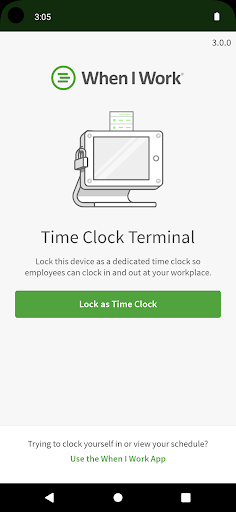
The When I Work Time Clock Terminal app makes it easy for your employees to clock in and out of their shifts. Set up the app on a tablet at your workplace using a valid When I Work account with Attendance.
When I Work Attendance works even better when used with Scheduling. Easily track scheduled time and actual time, process payroll accurately, and manage your labor budgets with ease.
User Reviews

The clock-in process feels way slower than it should be. Employees have to tap the text box first, wait for the keyboard, then type on tiny phone-style keys every single time they clock in or out. Employees are entering numbers anyway, so the full phone keyboard feels unnecessary. Since employees interact with this at least 4 times a day for clock in, breaks, and clock out, it becomes frustrating pretty quickly in a busy environment. An always on-screen keypad would make this so much better

App doesn't work on Android. Period. Dont tell me to contact your support, because they have no idea how to fix it either. After 3 days of back and forth they confirmed that it doesn't actually work but 'they are looking into it' and dont have any timeline for a fix. In other words 'go away, we dont really have an app'. Any wonder the ratings for this app keep dropping?

I have been using this app on both IPAD and Samsung tablets for months...and am happy to report that we haven't had any issues!! We have about 15 employees who use this as our time-clock system, at multiple work sites, and I am pleased to report...NO NO ISSUES!!!!! One of our IPADS conked out, and I had to download everything onto a Samsung tablet...including the time-clock app...and was pleasantly surprised to power it up and keep on working without any hitches or interruptions!!!!
Downloaded the app to be able to see the list of employees and manually clock them in and out myself upon request like my coworkers on iPhones can do. It appears the Samsung version only has the time clock feature for them to punch in their numbers. I remember having this app 1yr+ ago and was able to access more, not sure what happened here.
How to Download Time Clock Terminal APK
- Enter the package name
com.thisclicks.wagebaseon the APK Downloader. - Select your device architecture (ARM64 recommended for modern devices).
- Click Download to get the merged APK file.
- Transfer and install the APK on your Android device.
- Keep Updated: Visit APKDER.COM regularly to search for and download the latest secure versions of your favorite apps.
Security & Signature Verification
This APK download is 100% safe. We verify that the cryptographic signature of the file matches the official developer credentials. No modifications or adware are injected.


