




Download Sources
Device Configuration
Split APKs Installation Guide
Some apps are distributed as Split APKs (multiple .apk files packaged together) to optimize resources. Standard Android installers cannot open them.
What's New
New: Updated coding data for I-level 03-2026
New: Model-specific motorcycle selection
New: Translations for additional languages
About this app
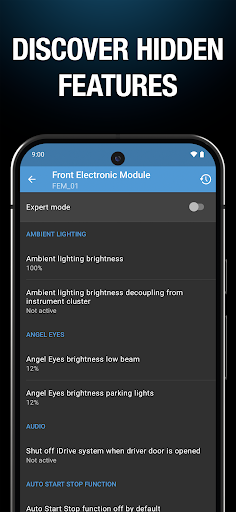
With BimmerCode, you can effortlessly code your BMW, MINI, or Toyota Supra yourself and configure it individually for the ultimate driving experience. Discover hidden features and customize your vehicle according to your personal preferences.
SUPPORTED CARS
- 1 Series (2004 – 2024)
- 2 Series, 2 Series Coupe, M2 (2013+)
- 2 Series Gran Coupe (2020 – 2024)
- 2 Series Active Tourer (2014+)
- 2 Series Gran Tourer (2015 – 2022)
- 3 Series, M3 (2005+)
- 4 Series, M4 (2013+)
- 5 Series, M5 (2003+)
- 6 Series, M6 (2003+)
- 7 Series (2008+)
- 8 Series (2018+)
- X1 (2009+)
- X2 (2018+)
- X3, X3 M (2010 – 2024)
- X4, X4 M (2014+)
- X5, X5 M (2006+)
- X6, X6 M (2008+)
- X7 (2019+)
- Z4 (2009+)
- i3 (2013+)
- i4 (2021+)
- i8 (2013+)
- iX1 (2022+)
- iX2 (2024+)
- iX3 (2021+)
- iX (2021+)
- MINI (2006+)
- Toyota Supra (2019+)
You can find a detailed list of the supported cars and options on https://bimmercode.app/cars/.
REQUIRED ACCESSORIES
One of the supported OBD adapters is required to use BimmerCode. For more information, please visit https://bimmercode.app/adapters/.
User Reviews

The only reason I wouldn't give this a 5 star is that it all really should be in 1 app. BimmerCode and BimmerLink should be 1, and possibly be $10 less in total. That said, it's a good option which is pretty powerful and likely equal to the cost of 1 dealer diagnostic, if you have any DIY automatics knowledge of the systems it can interact with. Don't buy one without the other, in my opinion.

I paid for a full subscription in 2019, and was told that it could be used anytime thereafter. I attempted to use it again recently with the same credentials as before, but I'm being instructed to pay full price (again), which is now $10 more. Customer support only responds with instructions on how to reinstall the app claiming it would then work, but it won't. Proper customer service would have been to a have a record of the purchased subscription on their end, to assist and resolve this issue.

I was led to believe that I was able to code certain items on a mini cooper after doing the proper amount of research on the developers own website. Finally purchased the app and found that I could NOT code the few things I wanted to despite them all being listed as things I could change on the site. This would sting a little less if the app was a few bucks, but to spend 42 dollars and find that you can't do what was advertised.... kind of fraudulent in my opinion.

Works absolutely flawlessly on my 2011 Mini R56 with the CX Bluetooth OBD adapter. I was skeptical, but what I love is that is the default mode translates everything into English and has most of the standard function controls I wanted to modify (Comfort access and hot & cold bulb checking). In addition to being super easy to use, it also has access to the full set of configurable options, provided you speak German or have the translation handy for every conceivable setting you might want to ever change. It doesn't appear to have any functionality for VO modification, so you can't use it to enable a retro-fitted alarm, for example, but this is absolutely wroth the money for the full version (one time fee, not a subscription) and saved me days of trying to figure out NCS Expert. Thanks!
How to Download BimmerCode for BMW and MINI APK
- Enter the package name
de.appomotive.bimmercodeon the APK Downloader. - Select your device architecture (ARM64 recommended for modern devices).
- Click Download to get the merged APK file.
- Transfer and install the APK on your Android device.
- Keep Updated: Visit APKDER.COM regularly to search for and download the latest secure versions of your favorite apps.
Security & Signature Verification
This APK download is 100% safe. We verify that the cryptographic signature of the file matches the official developer credentials. No modifications or adware are injected.


