

Volkswagen Park Assist Pro APK Screenshots


Volkswagen Park Assist Pro App Information
Download Sources
Device Configuration
Old Versions of Volkswagen Park Assist Pro
| Version | Size | Min OS | Architecture | Release Date | Action |
|---|---|---|---|---|---|
| v2.3.1 (2503141318) | 122.4 MB | Android 26+ | x86 x86-64 armeabi-v7a arm64-v8a | Nov 7, 2025 | Download |
| v2.3.0 (2502201522) | 122.4 MB | Android 26+ | x86 x86-64 armeabi-v7a arm64-v8a | Dec 22, 2025 | Download |
| v2.2.2 (2411041504) | 121.6 MB | Android 26+ | x86 x86-64 armeabi-v7a arm64-v8a | Nov 9, 2025 | Download |
Split APKs Installation Guide
Some apps are distributed as Split APKs (multiple .apk files packaged together) to optimize resources. Standard Android installers cannot open them.
What's New in Volkswagen Park Assist Pro
We fixed a bug introduced with the previous version which led to connection interruptions. We also adjusted the QR code scanning for better recognition and to avoid timeouts.
About Volkswagen Park Assist Pro
Parking has never been so easy:
· Start the park assist system in the vehicle and choose the right parking space
· Problems in tight spaces, multi-storey car parks and narrow garages are a thing of the past
· Stop. Get out. Get parked.
THE PARK ASSIST SYSTEM AT A GLANCE:
· Safe parking and manoeuvring – as if by magic
· Automatic scanning for roadside parking spaces
· Parking manoeuvre selection based on specific parking space
· Remote-controlled parking via app outside the vehicle
HERE""S HOW IT WORKS:
The Park Assist Pro app installed on your smartphone connects to your vehicle via Bluetooth.
As you arrive at your destination, start your park assist system in the vehicle and choose how you""d like to park (e.g. parallel).
The assist system checks the side of the road for available parking spaces of the right size and shows you on the display once it""s found what it""s looking for. When you switch the engine off, you can send the parking process to the app via the infotainment system and get out of the car, looking out for oncoming traffic.
You can now start the parking process in your Remote Parking Assistant app. The assist system takes control of your vehicle and parks in your chosen space by itself.
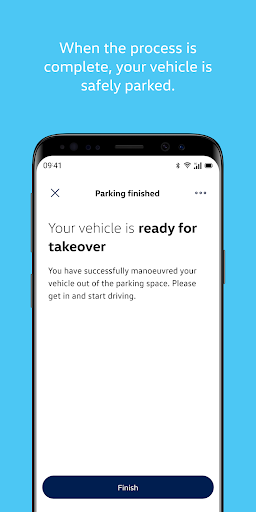
For safety reasons, you need to hold down the app""s Drive button at all times and stay close to the vehicle. When the process is complete, your vehicle is safely parked and locks automatically.
When you""d like to drive away, launch the app within range of your vehicle and select a parking manoeuvre. Your vehicle""s Park Assist Pro will then manoeuvre your vehicle back out of the parking space, taking traffic into account.
When the selected manoeuvre is complete, you can get into your car and take the wheel.
Please note that the Volkswagen Park Assist Pro app is currently only available for use with the relevant special equipment (""Park Assist Pro – ready for remote-controlled parking"").
Terms of use: https://consent.vwgroup.io/consent/v1/texts/RPA/de/en/termsofUse/latest/pdf
Data privacy notes: https://consent.vwgroup.io/consent/v1/texts/RPA/de/en/DataPrivacy/latest/pdf
User Reviews

It takes too long before you can start controlling the car. It's also unreliable. Sometimes it just doesn't connect and it's impossible to figure out why. So you have to push the buttons again and again, restart the app. Sometimes the parking gets interrupted and the app neither let's you control the car nor stop the process. Sometimes the app crashes and you cannot reconnect as the car is already in parking mode. The feature is great. This app (and probably the car's software) is not.

Works, but very limited. User experience is poor - please look how your competitor's apps work. Extra screens and question that make it faster to go into the car and drive it in/out than to use this app. When you finally enter the mode to remotely control the vehicle, it often gets disconnected before you finish the job. I understand there are many safety concerns with this kind of remote control, but the feature should be more user friendly and reliable.

Went from a working app to one that didn't want to connect anymore. Logged out of the app and have no way to reconnect as the car is stuck in an endless loop. I read online multiple ID7 customers have this issue and needed to go back to the dealer to reset.

The app tells me that to set this up, I need to access a certain menu from my car infotainment system. But that menu does not exist, and it's not immediately clear why - have I done something wrong? No, after some internet sleuthing I found out something that the app could have easily told me. Apparently this functionality is not available in the UK for my ID4. Maybe VW are trying to hide the fact that there is limited functionality in some countries.
How to Download Volkswagen Park Assist Pro APK
- Enter the package name
de.volkswagen.papon the APK Downloader. - Select your device architecture (ARM64 recommended for modern devices).
- Click Download to get the merged APK file.
- Transfer and install the APK on your Android device.
- Keep Updated: Visit APKDER.COM regularly to search for and download the latest secure versions of your favorite apps.
Frequently Asked Questions
Yes! Every APK download provided by APKDER undergoes rigorous security verification. We verify that the cryptographic signature of the APK file matches the official signature from the developer, ensuring the APK is original, untouched, and free from any modifications.
To install it, you first need to enable "Unknown Sources" in your Android device's security settings. After downloading the APK file from APKDER, tap it to begin the installation and follow the on-screen prompts.
Yes! As soon as the developer releases a new version of Volkswagen Park Assist Pro, we will update and provide the updated APK on APKDER. You can simply download and install the new APK over the existing installation without losing your app data.
Yes. APKDER allows you to bypass geographic restrictions and download official APK files directly, even if the app or game is not officially available in your country's store.
A standard APK is a single installation package. An XAPK or Split APK contains multiple resource files (like OBB expansions or device-specific layout parts) packaged together. To install them, you can download splits individually or use dynamic helper tools like Split APKs Installer (SAI).
Security & Signature Verification
This APK download is 100% safe. We verify that the cryptographic signature of the file matches the official developer credentials. No modifications or adware are injected.


