



Download Sources
Device Configuration
Split APKs Installation Guide
Some apps are distributed as Split APKs (multiple .apk files packaged together) to optimize resources. Standard Android installers cannot open them.
What's New
v6.1.6
🌱Gorgeous lyrics, even better on your lock screen
🍁Custom song order for all your albums with new tags
v6.1.1
🎈Enhance player more efficient
🍍Optimize users feedback issues, better experience
🍒Some UI optimization, more easy to use
v5.9.2
🚀Improve playback efficiency, more easy to use
🍀Product system optimization, run more stable
About This App
Music & Mp3 Player with Powerful equalizer, Stylish UI Design, Quick search all music files.
This is Ad Free version for your choice.
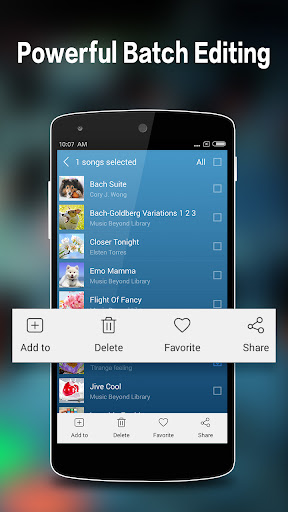
Easily browse and play music songs by albums , artists , songs and folder. Music & Mp3 Player lets you manage all your music files more easier.
This audio player supports almost all types of mp3 and other familiarly audio formats .
Features :
- Plays all audio files
- 5 band graphic equalizer with presets
- Dynamic change background style
- Play , next or previous playback by shake
- Plays song by folder
- Set as Play Next song
- Drag to sort play list
- Edit the song details
- Trim/Edit Music file
- Online hot music videos
- Sleep timer
- Headset support.
- home screen WIDGETS support
- Lyric support.
- Notification STATUS support
- Music Library wide SEARCH(Only support scan local song files).
User Reviews

Holy *bleep*, after downloading, trying, and subsequently uninstalling like six different apps, this is the best couple bucks of Google credit I've spent. First I wanted FLAC and OGG support; that ruled out a lot of players. Next I wanted to be able to specify the order of songs in a playlist; apparently most players are content to just offer a few sort order options (and I'm not renaming all my tracks with numeric prefixes or w/e!). Gave this a go, and it was just what I was looking for!

I'm enjoying it so far I've paid for the one off payment because I hate adds. I'd love to be able to put my playlists at the top rather than the 4 that come with the app. Also being able to see the playlists as a grid would be great. Being able to back up the track list/layouts to Google would also be great. Great app if already this good I'll be using for life.

I switched to this app from the free version. It's nice that there are no adds, but all of my customizations were not carried over, so I need to fill in the info for each song again. Also, is there a way to change the theme in the pro version? I just ended up switching back to the free version

Performance Issues. Plays intermittently. Shuts off all the time. Can't walk or move when listening to music or it stops, volume goes up and down, Google Assistant keeps popping up. All I want is to listen to music while I work, exercise, but it keeps stopping. It is probably the phone update that caused this, not your app. I'll keep using it and hope Samsung or Google can fix.
How to Download Music Plus - MP3 Player APK
- Enter the package name
media.adfree.music.mp3playeron the APK Downloader. - Select your device architecture (ARM64 recommended for modern devices).
- Click Download to get the merged APK file.
- Transfer and install the APK on your Android device.
- Keep Updated: Visit APKDER.COM regularly to search for and download the latest secure versions of your favorite apps.
Security & Signature Verification
This APK download is 100% safe. We verify that the cryptographic signature of the file matches the official developer credentials. No modifications or adware are injected.


