



Download Sources
Device Configuration
Split APKs Installation Guide
Some apps are distributed as Split APKs (multiple .apk files packaged together) to optimize resources. Standard Android installers cannot open them.
What's New
If you have suggestions or questions you can easily reach us per mail at [email protected]. Happy testing!
About this app
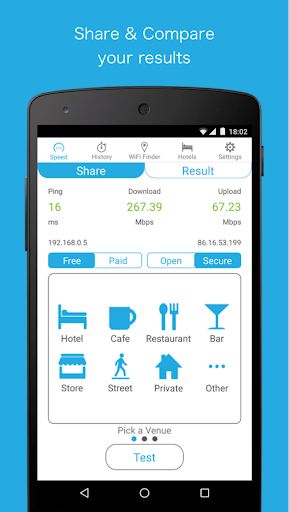
Speedcheck is the only speed test that lets you test your internet connection on both Wi-Fi and cellular networks, keep track of your speed tests and contribute your results to a crowdsourced map of Wi-Fi Hotspots that shows the speed of each hotspot. You can use the included Wi-Fi Finder to find Free and Fast Wi-Fi - in Hotels, Cafes, Restaurants - anywhere in the world.
Main Features:
✓ Run Speed Tests for your cellular Network on 3g, 4g, LTE connections to improve your coverage
✓ Test the Download and Upload Speed and Ping of WiFi Hotspots on dsl, adsl, cable connections.
✓ Help make finding free WiFi Hotspots with fast network connections possible by contributing your test results to the crowdsourced Wi-Fi Finder database
✓ Worldwide high speed data server network for reliable results
✓ Keep track of your internet speed tests in your personal result history. The includes download and upload speed, ping, signal strength, network name, internal and external IP and the test date.
✓ Compare your different 3g, 4g, LTE cell speed tests. Study the reliability of your broadband dsl, adsl, cable connections over time.
✓ Use the Wi-Fi Finder to access a coverage map that let’s you easily locate free, fast WiFi Hotspots around you in Hotels, Cafes and Restaurants and other public locations like stores, bars and libraries
User Reviews

I really like this app, it seems very accurate, very easy to use even for novices, provides a lot of info, and does both WiFi and Mobile Data, so you can compare the two if you want, it uses an icon to indicate between WiFi and Mobile Data tests, oh and no ads!!!!!

Fail! 9999ms ping, zero upload, zero download,I read privacies, gave all permissions requested. I called your 1-855- phone number 5 times always busy, too difficult, I thought to send feedback, you wanted my email, and I said why get myself Spammed ... I'm going to undo permissions, and uninstall. Just dislike troubles. 3 day old brand new phone.
Why do these app designers build in settings to distinguish between 4G and WiFi but assume that WiFi means you have unlimited data. Using a 4G modem and connecting numerous devices via Wi-Fi is now very common, but these apps continue to use more data than they do compared to when on a direct 4G connection.
Have been using it for almost a year. I'm impressed by it and found that the results compare favourably with other speed tests. I am happy to continue using this. However the advertisements bug!
How to Download Speedcheck APK
- Enter the package name
org.speedspot.speedspoton the APK Downloader. - Select your device architecture (ARM64 recommended for modern devices).
- Click Download to get the merged APK file.
- Transfer and install the APK on your Android device.
- Keep Updated: Visit APKDER.COM regularly to search for and download the latest secure versions of your favorite apps.
Security & Signature Verification
This APK download is 100% safe. We verify that the cryptographic signature of the file matches the official developer credentials. No modifications or adware are injected.


