
Speedtest by Ookla APK Screenshots


Speedtest by Ookla App Information
Download Sources
Device Configuration
Old Versions of Speedtest by Ookla
| Version | Size | Min OS | Architecture | Release Date | Action |
|---|---|---|---|---|---|
| v6.0.2 | 36.5 MB | Android 24+ | arm64-v8a | Apr 24, 2025 | Download |
| v5.5.0 | 35.8 MB | Android 23+ | arm64-v8a | Jan 8, 2025 | Download |
| v5.0.5 | 36.8 MB | Android 23+ | arm64-v8a | Jul 4, 2023 | Download |
| v4.8.0 | 30.3 MB | Android 21+ | arm64-v8a | Nov 4, 2022 | Download |
| v4.5.36 | 22.5 MB | Android 19+ | arm64-v8a | May 28, 2021 | Download |
| v4.4.22 | 12.9 MB | Android 17+ | armeabi-v7a | Nov 21, 2019 | Download |
| v3.2.44 | 18.0 MB | Android 15+ | armeabi | Apr 23, 2018 | Download |
| v3.2.39 | 15.6 MB | Android 9+ | armeabi | Jan 11, 2018 | Download |
Split APKs Installation Guide
Some apps are distributed as Split APKs (multiple .apk files packaged together) to optimize resources. Standard Android installers cannot open them.
What's New in Speedtest by Ookla
We've added a few updates to make the Speedtest app even better. Please give us a star rating or write us a review to let us know what you think.
Downdetector Favorites Update: New accounts can now save up to 5 favorites. Existing users? Don't worry, your current favorites are grandfathered in!
Better Browsing: We’ve optimized the layout below your speed test to show you the most relevant info first.
Bug Fixes
Thanks and happy testing!
About Speedtest by Ookla
ATTENTION: This is a version of our app that does not allow for the removal of advertisements via in-app purchase. It is built specifically for countries where in-app purchases from Google Play are disabled.
Use Speedtest® by Ookla® for an easy, one-tap connection internet performance and speed test —— accurate anywhere thanks to our massive global server network.
Explore mobile network coverage maps based on real-world data gathered by the Speedtest app. Visualize many mobile carrier networks’ availability down to the street level, right in the app.
Millions of people have made Speedtest the #1 tool for testing internet speeds, and it’s trusted daily by professionals throughout the industry:
- Discover your download, upload and ping
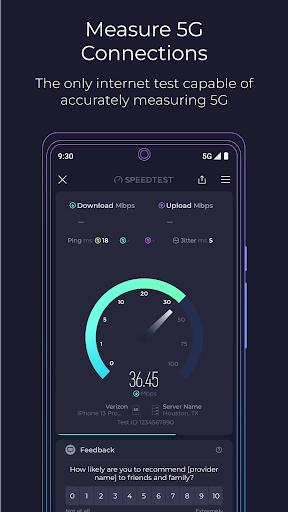
- The only internet connection test capable of accurately measuring 5G
- Mobile carrier coverage maps
- Real-time graphs show connection consistency
- Test with a single connection to simulate downloading a file or multiple connections to understand max speed
- Troubleshoot or verify the speed you were promised
- Track past tests with detailed reporting
- Easily share your results
We encourage you to read our updated Privacy Policy: https://www.speedtest.net/privacy
Do not sell my personal information: https://www.speedtest.net/about/ccpa
User Reviews

excellent but last version is showing us a chart while testing network connection but now it doesn't exist any chart while testing the network connection

Amazing. I use it regularly and it works for games too. People are expecting it to fix their wifi and give them better ping in their games but this app test the speed of your wifi, it doesn't fix it. Overall, great app!

The best speed test app out there. Accurate, fast and it doesn't chew up a chunk of bandwidth. I'd recommend this app to everyone in a heartbeat

Slow , after each speed test asking if you are satisfied with your ISP or your smart phone and this is boring. Most of the time shows wrong ping (above 500) and after restart and clear cash work normal but for one or two time. Should say good bye Ookla
How to Download Speedtest by Ookla APK
- Enter the package name
org.zwanoo.android.speedtest.gworldon the APK Downloader. - Select your device architecture (ARM64 recommended for modern devices).
- Click Download to get the merged APK file.
- Transfer and install the APK on your Android device.
- Keep Updated: Visit APKDER.COM regularly to search for and download the latest secure versions of your favorite apps.
Frequently Asked Questions
Yes! Every APK download provided by APKDER undergoes rigorous security verification. We verify that the cryptographic signature of the APK file matches the official signature from the developer, ensuring the APK is original, untouched, and free from any modifications.
To install it, you first need to enable "Unknown Sources" in your Android device's security settings. After downloading the APK file from APKDER, tap it to begin the installation and follow the on-screen prompts.
Yes! As soon as the developer releases a new version of Speedtest by Ookla, we will update and provide the updated APK on APKDER. You can simply download and install the new APK over the existing installation without losing your app data.
Yes. APKDER allows you to bypass geographic restrictions and download official APK files directly, even if the app or game is not officially available in your country's store.
A standard APK is a single installation package. An XAPK or Split APK contains multiple resource files (like OBB expansions or device-specific layout parts) packaged together. To install them, you can download splits individually or use dynamic helper tools like Split APKs Installer (SAI).
Security & Signature Verification
This APK download is 100% safe. We verify that the cryptographic signature of the file matches the official developer credentials. No modifications or adware are injected.


