



Download Sources
Device Configuration
Split APKs Installation Guide
Some apps are distributed as Split APKs (multiple .apk files packaged together) to optimize resources. Standard Android installers cannot open them.
What's New
• Bug fixes and performance improvements.
About This App
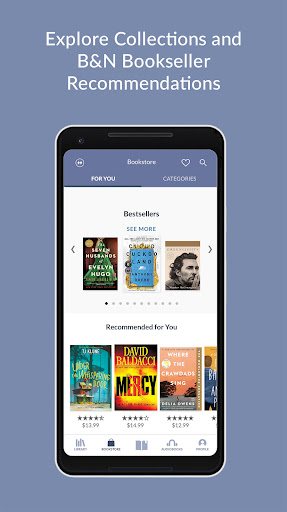
Get the FREE Barnes & Noble NOOK App for your Android smartphone or tablet to enjoy all your favorite digital content. Access our vast online library of over 4 million eBooks, graphic novels, comics, manga and magazines. Plus discover over 300,000 audiobooks. Enjoy recommendations just for you curated by our expert booksellers. Customize your experience with multiple font and page styles, customized bookshelves and social sharing tools. And never lose your spot— the Barnes & Noble NOOK App syncs across all your devices.
Barnes & Noble at Your Fingertips
-Browse the latest new eBook and audiobook releases, bestsellers, promotions, and expert recommendations just for you!
-Discover books in every genre, about every subject, for every age: contemporary fiction, romance, mystery and thriller, classics, sci-fi and fantasy, manga, kids, young adult, non-fiction and more!
-Digital content purchased from Barnes & Noble will automatically appear in this app.
-Explore over 75,000 free eBooks and more than 10,000 free audiobooks.
-Sync your books, bookmarks, notes and highlights across all your devices for a seamless reading experience.
-Listen safely while you drive with Android Auto.
Rich, Customizable Reading and Listening
-Adjust font styles, line spacing, margins, page animations, narration speed, background color, and screen brightness for more comfortable reading.
-Add notes, bookmarks, and highlights as you read or listen. Share favorite highlights with friends across social networks.
-Set the Sleep Timer to coordinate audiobook listening to your schedule.
-Download, read, or listen to free eBook and audiobook samples, and add favorites to your Wishlist.
-Organize your Library into custom shelves.
-Search inside the book and look up words with the in-app dictionary.
-Store content on your device or in the cloud.
- Accessible to blind and low-vision users leveraging Android assistive technology that includes screen magnification and TalkBack.
One App for the Whole Family
-With Profiles, family members can share an account while still enjoying their own customized experience.
-Share eBooks audiobooks, magazines, newspapers and comics across Profiles—no need to purchase again! Reading position, bookmarks, highlights and notes are saved to each Profile.
-Child Profiles allow parents to control what each child sees.
User Reviews

After over a decade of using this app on Android and iOS devices, it's now unable to sync the library to download new purchases. I'm so angry as there seems to be no fix, and signing out and reinstalling only gets you fully stuck out of current AND past purchases. Unbelievable. I have hundreds of dollars worth of books stuck in limbo unable to be read because of an app server issue that B&N is totally incapable of providing support for. This is why people read with Amazon.

Love the Nook app. It offers plenty of books to read---often at a good price, too... Can someone please tell me why a lot of my ebooks are no longer showing a cover in my library? It's very aggravating. They were there before, and now they're gone. Having a picture on the cover helps to visualize what the characters look like. It makes the story more enjoyable. A lot of times, that is why I bought the book. Why are they missing???

I wanted to support Barnes and Noble, but this app has lots of problems. The page turning looks cool, but if you go back to the last page, when you flip forward it skips pages and you have to keep trying to get it back on track. The time estimates are off and didn't adjust. It would say that I had 30+ minutes left in a chapter that took 5 minutes. I couldn't highlight anything. The dictionary routes you to Google or Wikipedia. Overall not great, but I was able to read the book.

Loses one star for interrupting my day to ask me to write a review. The e-reader itself is fine, works on my phone and is easy to use. It is annoying however that you can't purchase books on the app--you have to buy them on the website and then open them in the app. It is 2026 people; there are apps that write a book for you but you can't be bothered to add a bog-standard store to your app, and you're a major bookseller? No wonder Amazon trounces you.
How to Download Barnes & Noble NOOK APK
- Enter the package name
bn.ereaderon the APK Downloader. - Select your device architecture (ARM64 recommended for modern devices).
- Click Download to get the merged APK file.
- Transfer and install the APK on your Android device.
- Keep Updated: Visit APKDER.COM regularly to search for and download the latest secure versions of your favorite apps.
Security & Signature Verification
This APK download is 100% safe. We verify that the cryptographic signature of the file matches the official developer credentials. No modifications or adware are injected.

