



Download Sources
Device Configuration
Split APKs Installation Guide
Some apps are distributed as Split APKs (multiple .apk files packaged together) to optimize resources. Standard Android installers cannot open them.
What's New
* Easier navigation – We moved it to the bottom of the interface for easier access with your thumb.
* New features – We’ve added Privacy Advisor and the ability to auto-clean your device and automatically scan your Wi-Fi for potential threats.
About this app
Get AVG AntiVirus FREE - Mobile Security for Android to help protect you from harmful viruses and malware. Keep your personal data safe with App Lock, Photo Vault, Wi-Fi Security Scan, Hack Alerts, Malware security, and App Permissions advisor.
Over 100,000,000 people already installed AVG’s antivirus mobile security apps. Join them now and:
✔ Scan apps, games, settings, and files in real-time
✔ Clean unnecessary files to free up space
✔ Lock sensitive apps with a PIN, pattern, or fingerprint
✔ Hide private photos in an encrypted Vault
✔ Block scam calls and texts
✔ Stay anonymous with VPN
✔ Scan Wi-Fi networks for threats
✔ Discover and block scam sites to stay extra-safe
✔ Check Wi-Fi download and upload speed
✔ Receive alerts if your passwords have been leaked
✔ Get insight into the permission level of installed apps
✔ Powerful cybersecurity tool that can defend your Android device against a wide range of threats
With AVG AntiVirus FREE 2026 for Android you’ll receive effective virus and malware protection, app lock, Wi-Fi Scanner, and photo vault to help shield you from threats to your privacy and online identity.
App Features:
Protection:
✔ Scan apps, games, and files with our antivirus and remove malicious content
✔ Wi-Fi Scanner for network encryption
✔ Hack Alerts: Get warned if your passwords are compromised
✔ Smart Scan: Run an advanced scan and find vulnerabilities hidden in hard-to-find places on your phone.
Scam Guardian
✔ Web Guard: Advanced tools to help keep you safe from hidden scams while browsing, banking, and shopping online. Scan and block malware-infected links, as well as Trojans, adware, and spyware (for privacy and safe web browsing, e.g. Chrome).
Scam Guardian Pro
✔ Call Guard (Call Blocker): Automatically blocks scam calls and labels if the call is a potential scam, spam, or a verified business
✔ SMS Guard: Powerful scam protection for every text message
✔ Link Guard: Scan websites to see which ones are real and fake
Privacy:
✔ Hide private photos in a password-protected Vault to prevent snooping
✔ App Lock: lock sensitive apps to protect your privacy and safety
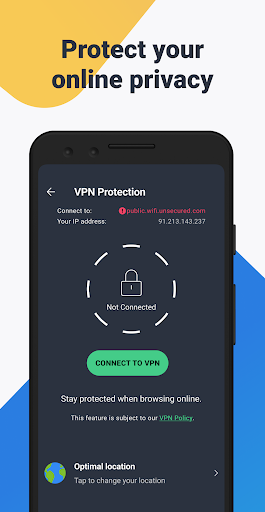
✔ VPN Protection: Secure your online privacy
✔ App Permissions: get insight into the level of permission required by your installed apps
Performance:
✔ Clean unnecessary files and free up storage space
✔ Check Wi-Fi download and upload speed
✔ Junk Cleaner: Remove hidden junk, free up disk space
Hack Alerts:
✔ See which accounts have been compromised in past leaks
✔ Get warned if a new leak puts your data at risk
✔ Discover the details behind each leak and when they happened
✔ Change compromised passwords easily and quickly
App Insights:
✔ See permissions requested for individual apps
✔ See where your data is used
✔ Discover potential privacy issues
Keep your phone safe against viruses, ransomware and other malware.
This app uses Accessibility Service API to protect the visually impaired and other users against phishing attacks and malicious websites via Web Shield feature.
By installing or updating this app, you agree that your use of it is governed by these terms: http://m.avg.com/terms
Download Antivirus for Free Now!
User Reviews

AVG Antivirus and Security app is a good choice when considering free versions of Android protection. after a scan of your device and viewing the results, a short add auto plays that's non intrusive and can be totally ignored as you are not held captive like so many other app that have a add based version. over the years, I have grown to trust AVG as they have remained consistent with its product mission, unlike my past experiences with Avast, Norton, McAfee ect . more to critique but out of wor

I am so disappointed in this app for my android phone. it literally takes a couple minutes of waiting to open a website, and some of them just time out, even though all permissions are a yes and the settings are all open. For example, the Libby app Will only open if I turn AVG off. That is one I use daily. I'm sorry I paid for a whole year. I will definitely. not renew and may even Uninstal it.

Rated poorly due to lack of easy voice access to support channels. Expensive and confusing to use. Lots of features are unsold with offer. Customer voice support is very hard to contact. I was double charged for features that operated simultaneously. Also I was charged for technical support that was not complete and I could not debate the charge. Also, the control panel does not display full-screen, blockung some interaction.

Edit: thank you for reply, have reached out. Anticipating response. Updating star to 3, expect to return to 5 after assistance... I've used AVG for several years and have always been happy with it. My android system just updated, as did my AVG. Having problems and I think I am being charged twice. Additionally, the history of protection is at 0 days? Something strange is happening. Also, the check network continues showing red, at my home, even after continuously checking it!
How to Download AVG AntiVirus & Security APK
- Enter the package name
com.antiviruson the APK Downloader. - Select your device architecture (ARM64 recommended for modern devices).
- Click Download to get the merged APK file.
- Transfer and install the APK on your Android device.
- Keep Updated: Visit APKDER.COM regularly to search for and download the latest secure versions of your favorite apps.
Security & Signature Verification
This APK download is 100% safe. We verify that the cryptographic signature of the file matches the official developer credentials. No modifications or adware are injected.


